Step 10 Run: Watching, Backing Up, Paying for and Supporting What You Built
Releasing a build is the start of its working life, and most of what can go wrong in that life happens when nobody is looking: the job that did not run, the log that holds a name, the backup that was never restored, the invoice that arrives a month later. This chapter covers Step 10 Run, the second step of Part V, and the developer function behind it, D5 Steward: owning software over time, which includes watching it, backing it up, paying for it and answering when it fails. The chapter makes one claim. Run what you built as someone who will be told when it breaks: watch four things, log without personal data, back up only what you have shown you can restore, set a limit on cost, and write down who is called and what the first hour looks like.
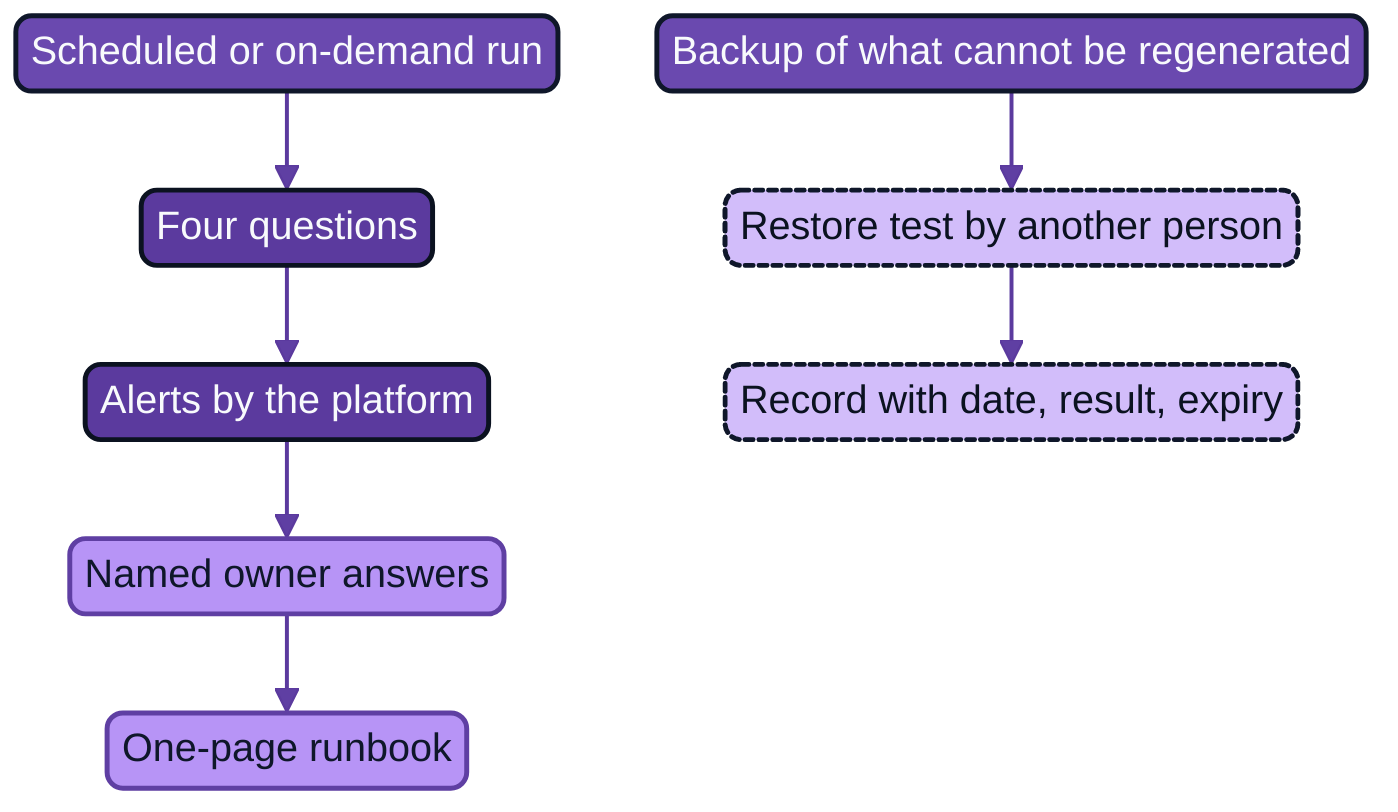
Figure 14.1: What to watch and who answers, with the restore test that makes a backup a fact.
The step applies AI Operations, the volume of the series that treated IT operations, at the scale of one builder and one small tool. Three of its conclusions carry over. The first is the observer principle (AI Operations, Chapter 17), which asks that what verifies an action is independent of what performed it, that the observer does not depend on the system it observes, and that the stop path works when the platform does not (83, Nordqvist, 2026). The second is that resilience is a claim with a scope, an objective, a measurement, a date and a result, and that only a verified claim may be called recoverable (AI Operations, Chapter 19). The third is the change authority of Chapter 22: who may stop, who may change, and who is reachable. The stewardship principle of AI Developer supplies the frame (86, Nordqvist, 2026): the owner passes the tests Name, Understand and Revert, and this step is where they are exercised in daily life.
What a developer does at this step
A developer who has released something does three things in order. First observe: decide what to watch, so that a fault is found by the owner and not by a user. Then back up: keep a copy of whatever cannot be recreated, and show by restoring it that the copy works. Then respond: know who is called, what is done in the first hour and how what happened is recorded and learned from.
The practice has a familiar slogan. At Amazon, in a 2006 interview, the company's chief technology officer put it as "You build it, you run it" (52, Gray, 2006). The argument is one of feedback: a team that is told when its software fails builds differently. For a builder who is not a developer the slogan needs a boundary. The platform team runs the servers, the pipeline, the secret store and the backups of the repository. The builder runs the tool: its results, its failures, its users and its costs. The boundary is written down in the runbook so that nobody assumes the platform watches the tool, and nobody assumes the builder can restore the platform.
The observer principle gives three simple checks for a builder's setup. Independence: the alert that says the job did not run is evaluated by the platform scheduler and not by the job, because a job that has crashed cannot report that it has. Dependence: the alert does not depend on the thing it watches; a message that is sent only from inside the tool is no alert. Stop: the switch-off works when the tool does not, and is held by named people (the owner, the deputy and the platform on-call) outside the pipeline that shipped the release (Chapter 13).
What to watch
The Site Reliability Engineering literature of Google gives four signals that are worth measuring for any service: latency, traffic, errors and saturation. It recommends paging a person when one is problematic, and putting much more effort into catching symptoms than causes (65, Ewaschuk, 2017). A builder's tool is usually a job that runs once a week or a command that a few colleagues run on demand, and the four signals reduce to four plain questions.
- Did it run? For a scheduled job this is the question that matters most, because a job that does not start produces no error. The check is "a successful run exists between 06:00 and 07:00 on Monday", and the platform, not the job, evaluates it.
- Did it fail? The last run's status is failed, or the output is missing or malformed.
- Is it slow? A run that takes five minutes when it normally takes under one is usually a symptom of something changing in an input.
- What does it cost? The compute, storage and, where the tool or the assistant calls a model, the model use.
For each question the record names an alert, a person who answers it and the time within which they answer. A channel nobody reads is not an alert, and an alert that has never been seen to fire is a hope. The test is to cause the fault on purpose in a test environment and watch who receives the message, and the date of that test is recorded. The alert rules of service-point-check are below. The schema is the platform's, and the identifiers and dates are fictional and illustrative.
alerts:
  - id: ALR-NR-001
    name: job-did-not-run
    when: no successful run between Monday 06:00 and 07:00
    evaluated_by: platform-scheduler        # not by the job itself
    to: e-services team channel
    answered_by: [Hanna Wikström, Elin Berg]
    answer_within: the next working hour
    last_tested: {date: 2031-12-04, how: renamed the portal export path in the test environment, received_by: Elin Berg}
  - id: ALR-NR-002
    name: job-failed
    when: last run status is failed
    evaluated_by: platform-scheduler
    to: e-services team channel
    answered_by: [Hanna Wikström, Elin Berg]
    answer_within: the next working hour
    last_tested: {date: 2031-12-04, how: seeded a malformed notices.csv, received_by: Elin Berg}
  - id: ALR-NR-003
    name: job-slow
    when: "run longer than 5 minutes (observed runs take under 1 minute)"
    evaluated_by: platform-scheduler
    to: e-services team channel
    answered_by: [Hanna Wikström, Elin Berg]
    answer_within: the next working hour
    last_tested: {date: 2031-12-04, how: added a pause in the test environment, received_by: Hanna Wikström}
Logs and personal data
A log is the running record that a program writes about what it does. The Twelve-Factor App treats logs as a stream of events that the program writes to its standard output and that the environment collects, routes and stores, so that the program does not manage log files itself (63, Wiggins, n.d.). The stream is what makes it possible to search past events, graph trends and alert on thresholds. For a builder the practical consequence is to write events and let the platform keep them.
What goes into the stream is the builder's decision, and the law constrains it. The GDPR requires that personal data be adequate, relevant and limited to what is necessary in relation to the purposes for which they are processed (Article 5(1)(c), data minimisation), and kept in a form that permits identification of data subjects for no longer than is necessary (Article 5(1)(e), storage limitation) (4, European Union, 2016). A log is a second copy of whatever is written into it, kept for a different purpose and often for longer than the data it came from. The implication for design, not legal advice, is that a log which holds a claimant's name has become a database of claimants that nobody planned.
The mechanism by which this happens is ordinary. An assistant asked to "add logging so we can debug" often logs the whole row or the whole record, because that gives the most information for the least thought. A traceback, the printout that a program writes when it fails, can include the values of the data it was processing. The rule that this book recommends is therefore stated in positive form and written into the rules file the assistant reads: log what you need to find faults, which is the run, the time, the status, the counts and the identifiers, and never the contents. For service-point-check that is the run identifier, the start and end, the status, the number of mismatches by rule and the service-point identifiers. For claims-doc-check it is claim identifiers and counts and nothing else, which is also its never-do rule.
The rule is tested, not assumed. Add to the synthetic data a field that carries a marker no real record would contain, run the tool, and fail the test if the marker appears in any log line or output. The test below is written for claims-doc-check. It is a pattern: the function and flag names are illustrative.
import subprocess, sys
from pathlib import Path

MARKER = "ZZ-CANARY-NAME"          # appears only in synthetic data

def test_logs_hold_claim_ids_and_counts_only(tmp_path: Path):
    export = tmp_path / "claims_synthetic.csv"
    export.write_text(
        "claim_id,claim_type,doc_types_received,country,language,free_text\n"
        f"SYN-0001,motor_collision,photos,PL,pl,{MARKER}\n"
    )
    result = subprocess.run(
        [sys.executable, "-m", "cdcheck.cli", "--input", str(export), "--out", str(tmp_path)],
        capture_output=True, text=True, check=False,
    )
    everything = result.stdout + result.stderr
    everything += "".join(p.read_text() for p in tmp_path.rglob("*") if p.is_file() and p != export)
    assert MARKER not in everything
    assert "SYN-0001" in everything
Backups and restore tests
A backup is a copy of data or configuration kept somewhere else so that it can be put back after a loss. A restore is the act of putting it back. The sentence to remember is that a backup that has not been restored is a hope.
The evidence for the sentence comes from professionals. On 31 January 2017 data was accidentally removed from the primary database server of GitLab.com. In its post-mortem the company recorded that its backup procedure used a version of the backup tool that did not match the database, that the failures went unnoticed because the alert emails were rejected, that the storage location for the backups was empty, and that the process "of both finding and using backups failed completely". The best available copy was about six hours old, copying the data back took about 18 hours, and the loss was recorded as about 5,000 projects, 5,000 comments and 700 user accounts (64, GitLab, 2017). Atlassian's review of its April 2022 outage reports the same lesson at a different scale: the company could not at the time restore a large set of customer sites and their connected products from backups, and some customers waited up to 14 days (40, Atlassian, 2022). Neither company lacked competent people. Each had backups that had not been tested in the conditions of the failure, and the habit that closes the gap is the restore test.
A builder's tool usually holds little that cannot be recreated, and that is worth establishing before anything is backed up. The question is: what is the state? The answer sorts everything into five kinds.
- Code and configuration live in the repository, which the platform backs up. The release can be rebuilt from its tag.
- Rules and templates (
rules.yaml, the report text) are code and live in the repository. - Secrets are in the platform's secret store, which the platform backs up and tests, and which the builder cannot and must not copy.
- Output you create, such as a report page or a missing-documents list, is usually regenerable by running the tool again, and is then not backed up.
- Data you only read belongs to someone else. The portal export, the phone-service file and the claims export are their owners' to back up.
The restore test follows from the sort. For both builds in this book the thing to restore is the tool itself: a clean workspace, the repository at a tag and nothing else, and the proof is that the tests pass and the tool runs against synthetic data. If a build holds state that cannot be regenerated, that state is backed up and the test restores it to a copy and checks it by a count or a known record. The script below is the restore test for a build with no unrecoverable state. It was run on a small repository as a check of the method.
#!/usr/bin/env bash
# restore_test.sh: rebuild the tool from nothing and prove it still passes its tests.
# Usage: ./restore_test.sh <repository-url> <tag>
set -euo pipefail
repo="$1"; tag="$2"
work="$(mktemp -d)"
trap 'rm -rf "$work"' EXIT
start=$(date +%s)
git clone --quiet --branch "$tag" --depth 1 "$repo" "$work/build"
cd "$work/build"
python3.12 -m venv .venv
. .venv/bin/activate
python -m pip install --quiet -r requirements.lock
python -m pytest tests/ -q
end=$(date +%s)
echo "restored ${tag} and passed tests in $(( (end - start + 59) / 60 )) minute(s)"
A restore test is an experiment with a recorded result, and four conditions make it count. It is run by someone who did not write the runbook, following only the runbook, with the assistant switched off, so that it tests the document and not the author's memory. It has an objective, a number of minutes after which the restore would have been too slow. It records what was and was not tested, because "backed up" is not a claim until it says what, when and with what result. And it expires. AI Operations, Chapter 19, sets a default of 180 days for the restore or failover test of a service of the first tier (83, Nordqvist, 2026); the book's recommendation for a builder's tool is shorter, 90 days (illustrative), because the platform, the libraries and the exports beneath a small tool change often. A restore older than that counts as "not tested", which is a legitimate entry and is not the same as passed.
For Hansa Mutual's EU entities there is a regulatory reading as well. DORA Article 12 is titled "Backup policies and procedures, restoration and recovery procedures and methods" and requires that those procedures be tested periodically (2, European Union, 2022). A builder's tool is not itself one of the functions that the article was written for, and the implication for design, not legal advice, is that a group which has to evidence restore tests for its core systems will find the same discipline easy to apply to builds that touch them.
Costs
A tool costs money in three places: the compute and storage that run it, the licences of the builder platform and, where the tool or the assistant calls a model, the model use. The first two are usually visible to the platform team as a line in a showback report. The third can surprise, because a loop that calls a model repeatedly costs money until something stops it.
The remedy is a limit and an alert, set before the release. Hosted model services offer both. As one example of the pattern, the documentation of one vendor's API describes spend limits that set a maximum monthly cost an organisation can incur, lets the customer set its own limit below the tier's cap and set limits per workspace, and states that when a limit is reached requests stop until it is raised or the month ends (67, Anthropic, n.d.). The documentation describes one product, and the pattern, not the product, is the point. The pattern has a consequence that a builder must decide on in advance: a cap that is hit is a cost control and also an outage. The record therefore says who is told at 80 per cent of the limit, who may raise it and who is told when the tool stops. A job timeout is a cost control of the same kind, and the pipeline file in Chapter 13 sets one of ten minutes.
Support and incidents
Support is the answer to the question of who is called. At builder scale it is a short list in the runbook, in order: the owner and the deputy, in named hours; the platform's service desk, for faults in the platform; and the receiving developer or their team, for changes to the code, on request. The list also says what the tool's users do while it is down, which is the manual fallback of the process it replaced.
An incident is an event that interrupts or degrades the tool or exposes data it should not. The Site Reliability Engineering literature gives, for the first hour, a priority that serves a builder as well as an operations team: stop the bleeding, restore service and preserve the evidence for finding the cause. It also recommends that procedures be documented in advance and that the people who act in an incident have defined roles, with one person holding the overall state of the incident and a separate person making changes to the system (66, Stribblehill, 2017). A builder cannot staff four roles, and the point carries to one person and a deputy: one person decides what is done and writes it down, and one person operates. A builder does not both investigate and operate alone.
Two duties arise at once when personal data is involved. A personal data breach must be notified by the controller to the supervisory authority without undue delay and, where feasible, not later than 72 hours after becoming aware of it, unless the breach is unlikely to result in a risk to the rights and freedoms of natural persons, and the controller must document the facts, the effects and the remedial action (GDPR Article 33(1) and (5)) (4, European Union, 2016). The builder is not the controller and does not decide whether a breach has occurred. The builder tells the data protection officer at once and does not wait to be sure. For Hansa Mutual's EU entities, DORA Article 17 adds that a financial entity must have an ICT-related incident management process to detect, manage and notify incidents (2, European Union, 2022), which is why the builder reports through the group's service desk and does not classify the incident alone.
An incident is followed by a short review, written without blame, because the aim is to change the system and not to find a culprit (39, Lunney & Lueder, 2017). The incident record INC-* of AI Operations is the form: what happened, what was done, when, with what result, and what changes.
What vibe coding does instead
Vibe coding, building by conversation with an assistant without reading or structuring the result (Chapter 2), runs a tool in the way a person runs a spreadsheet: until someone complains. The script runs when the builder remembers to run it, from the builder's machine. Errors scroll past on the screen. There is no alert, because nobody wrote one, and no log, because the terminal window closed. The backup is the folder on the laptop and, if the laptop has a synchronised folder, a second copy that is deleted when the first is. The cost is learned from the invoice. The builder is the only person who can fix the tool, and the builder is on leave.
These are descriptions of a pattern and not measured shares; the book has found no study of how builders who are not developers run their software. The professionals' failures above show that the gap is not one of intelligence or effort. GitLab had backups and alerts, and neither worked when needed. What the professional adds is the habit of causing the failure on purpose before it happens: the seeded fault that fires the alert, and the restore that is carried out on a quiet day.
How AI helps and where it misleads
An assistant is a good drafting partner at this step. It drafts the runbook from the repository and the specification, proposes alert rules and thresholds, writes the restore script, explains a failing log line when the builder pastes it in, drafts the timeline of an incident from notes and drafts the first version of the review. These are drafting and explaining tasks, and the builder reads and runs the result. In the delegation profiles of this book the class operate has a ceiling of Level 0 Advisory: the assistant explains and drafts, and a person acts on the running tool.
It misleads in ways that each call for a control.
- It logs too much. The default way to make a program debuggable is to print the data. The control is the rule in the rules file and the canary test above.
- It states thresholds with confidence it does not have. "Alert after 3 minutes" is a guess. The control is to take the figure from observed runs, and to record the observed figure in the runbook.
- It reports a backup it did not verify. A script that ends without an error has not shown that the copy can be restored. The control is the restore test, followed by a person.
- It builds the alert inside the thing it watches. A check written into the tool's own code cannot detect that the tool did not start. The control is the independence check of the observer principle.
- It acts on production when it can reach it. A tool that can restart a service, delete files or edit configuration can do so on a wrong guess. AI Operations sets Level 4 Autonomous as never used for an irreversible action on production data, or for an action that disables the observation or the stop path itself (83, Nordqvist, 2026). Both carry over, together with the series' prohibition on any change to the assistant's own mandate or credentials (AI Developer, Chapter 4) (86, Nordqvist, 2026).
An assistant is never the only responder to a failure of what it helped to build. The observer would then be the thing observed, and the Understand test would be left to a tool that cannot explain a change a month later.
Proportion: what each tier needs
| Tier | Watch and respond | Back up and restore | Cost and support |
|---|---|---|---|
| A personal | You notice; know how to switch it off; no alerts required | A copy of your own data kept under a date; no restore test required | You pay for it; no support path |
| B team | A short runbook (purpose, switch-off, who to call, how to rerun); alert on failure and on non-run to a channel someone reads; logs without personal data | State sorted into five kinds; rebuild tested once before relying on it and after any change to how it runs | A cost limit if a paid service is used; owner and deputy as support |
| C business | A runbook RBK-*; alerts tested by a seeded fault; named answerer and time; incident path to the service desk and the data protection officer |
Restore test by someone other than the builder, with an objective, valid 90 days | Cost limit with owner and 80 per cent alert; support path into the service desk; receiving developer named |
| D project | Not a citizen build: the development organisation runs it | Not a citizen build | Stop and hand over (Chapter 6) |
Table 14.1: What Step 10 requires at each tier.
Practical guide: The runbook and the restore test
Purpose. Make the build something that a named colleague can watch, switch off, restore and call help for, and record the evidence with its date, so that the Run step is met by showing artefacts and not by feeling prepared.
Roles. The builder, who writes the runbook; the deputy, who runs the restore test and receives the test alert; the platform engineer, who owns the scheduler, the alerts and the backups of the platform; the service desk; the receiving developer; at Tier C the data protection officer for the incident path; the public-sector IT lead or the head of claims operations who approves the cost limit.
Inputs. The release and its change record (Chapter 13); the specification SPC-*; the ownership record OWN-*; the platform's alerting and showback tools; the state inventory of the build; the mandate.
Steps.
- Write down the state of the build in the five kinds above, and mark what is regenerable, what the platform backs up and what, if anything, the builder must back up.
- Write the four questions of What to watch as checks, each with an alert, an answerer and a time. Take any threshold from observed runs.
- Set what is logged and what is never logged, in the runbook and in the rules file of the assistant. Add the canary test and run it.
- Wire the alerts to a channel that a named person reads, and ensure the "did it run" alert is evaluated by the platform and not by the tool.
- Seed a fault for each alert in a test environment (a renamed input path, a malformed file), watch the message arrive, and record the date and the person who received it.
- Set the cost limit and the 80 per cent alert, and record who is told, who may raise the limit and what happens at the limit.
- Write the support path and the manual fallback, and the first-hour list: read the alert, say who has it, suspend if the output may be wrong, roll back if the release is the cause, tell the owner of a faulty input, record in one paragraph.
- Write the one-page runbook as
RBK-*in the repository. Ask the assistant to check it against the repository for commands that do not exist. - Have the deputy run the restore test following only the runbook, with the assistant off, and record the result in
RST-*, including what was not tested. - Walk through the first-hour list once as a drill with the deputy, and write down what was missing.
- Put the expiry of the restore test (90 days at Tier C) in the build record.
Exit gate. The step is finished when you can show: a runbook RBK-* in the repository; for each alert, the date on which a seeded fault reached the named person; a restore-test record RST-* dated within 90 days (Tier C) in which someone other than the builder followed the runbook with the assistant off, with minutes against the objective and a statement of what was not tested; the canary test passing in the pipeline; the cost limit and its owner; and the support path with a named deputy. A restore older than 90 days is recorded as "not tested".
Artefact. The runbook manifest and the restore-test record, both in the repository. The runbook for service-point-check follows. Identifiers, dates and figures are fictional and illustrative.
id: RBK-NR-2031-0001
version: 2
build: BLD-NR-2031-0001
date: 2031-12-01
purpose: Weekly report of mismatches between portal, phone script and notices (rules R1 to R3)
owner: {named: Hanna Wikström, deputy: Elin Berg}
runs: {schedule: "Mondays 06:00", report_expected_by: "06:15", job_timeout_minutes: 10}
watch:
  - {question: did-it-run,  check: a successful run exists between 06:00 and 07:00 on Monday, alert: ALR-NR-001}
  - {question: did-it-fail, check: last run status is failed, alert: ALR-NR-002}
  - {question: is-it-slow,  check: run longer than 5 minutes, alert: ALR-NR-003}
  - {question: cost,        check: platform showback line for this job, reviewed monthly, model_calls_at_run_time: none}
logs:
  keep: [run_id, started, finished, status, mismatches_by_rule, service_point_ids]
  never: [export contents, notice text, phone numbers, names]
state:
  regenerable: [report page (run the job again), release (rebuild from tag)]
  backed_up_by_platform: [repository, job configuration]
  restore_test: RST-NR-2031-0001
first_hour:
  - Read the alert; open the run record; say in the channel who has it.
  - Suspend the schedule if the report may be wrong: jobctl suspend service-point-check
  - If the last release is the cause, follow the rollback note in docs/rollback.md.
  - If a source export is missing or malformed, tell its owner (portal team or phone service) and rerun after the fix.
  - Write one paragraph in the build record; review it with Elin within a week.
support: [Hanna Wikström and Elin Berg (weekdays 08:00 to 16:00), platform service desk (platform faults), Rasmus Holm's team (code changes, on request)]
manual_fallback: compare the three sources for the 24 service points by hand, using docs/manual-check.md
The restore-test record that goes with it states its claim narrowly and says what was not tested.
id: RST-NR-2031-0001
build: BLD-NR-2031-0001
date: 2031-12-05
claim: service-point-check 0.2.0 can be rebuilt from the repository and the platform configuration alone
scope: [repository at tag v0.2.0, scheduled-job configuration]
objective: {minutes_to_restore: 30}
method: restore_test.sh in a clean workspace, following docs/runbook.yaml only
run_by: Elin Berg
assistant_used: false
result: {outcome: pass, minutes: 11, tests_passed: 21, tests_failed: 0}
not_tested: [platform secret store (platform team's own evidence), manual fallback]
expires: 2032-03-04
The two builds at this step
Hanna Wikström, Nordvik Region. Hanna's run is a weekly job. The failure alert goes to the e-services team's channel, and her deputy is Elin Berg, her colleague in the e-services team. The first runbook was a short Tier B note written on 2031-11-10; version 2, for the scheduled release, was written on 2031-12-01. On 2031-12-04 Hanna and Elin seeded two faults in the test environment, a renamed portal export path and a malformed notices.csv, and Elin received both alerts in the channel. On 2031-12-05 Elin ran the restore test (RST-NR-2031-0001) following the runbook only, with the assistant off. It passed in 11 minutes against an objective of 30, with 21 tests passing, and expires on 2032-03-04. The record says that the platform's secret store and the manual fallback were not tested by this record. The tool makes no model call at run time, so its cost is the platform's showback line and the ten-minute job timeout. In a short drill that day Elin walked through the first-hour list and added the line that tells the owner of a faulty input. The Step 10 gate in BLD-NR-2031-0001 is recorded as met on 2031-12-05.
Katarzyna Nowak, Hansa Mutual. Katarzyna's run is on demand: the handlers start the job claims-doc-check run in the claims analytics workspace, and the job's identity, not Katarzyna and not the assistant, reads the production export. Failure alerts go to the support of the claims analytics workspace, and the runbook RBK-HM-2031-0001 (2031-11-13) names Katarzyna, then Marek Zieliński, then the workspace support, then Tomasz Wrona for changes to the code. Logs hold claim identifiers and counts only, which her never-do rule requires, and the canary test above guards it in the pipeline. On 2031-11-14 Marek ran the restore test (RST-HM-2031-0001) on synthetic data with the assistant off: the tool was rebuilt from the tag in 18 minutes against an objective of 30, and the record says that the production export and the workspace's own backups were not within its scope. It expires on 2032-02-12. The tool calls no model at run time. The cost limit that was set concerns the assistant's use in the builder lane, a monthly spend limit per builder with an alert at 80 per cent that goes to Katarzyna and to the lane's owner (the figure is illustrative and is recorded in the build record). The Step 10 gate in BLD-HM-2031-0001 is recorded as met on 2031-11-14.
Across the degrees of delegation
The ceilings below are those of MND-NR-BLD-2031-01 and MND-HM-BLD-2031-01 for the work classes that touch this step. Level 4 Autonomous is not used for any action class.
| Class of work | Usage mode | Ceiling | What the step requires |
|---|---|---|---|
| Document (runbook, incident timeline) | Mode 1 to Mode 2 | Level 1 Assisted | The builder checks every command against the repository |
| Draft alert rules and restore script | Mode 2 | Level 1 Assisted | The alert is evaluated by the platform; a person runs the script |
| Explain a log line or a failure | Mode 1 to Mode 2 | Level 1 Assisted | Only logs without personal data are pasted into the assistant |
| Operate (suspend, restart, restore) | none | Level 0 Advisory | The owner or deputy acts; the assistant explains |
| Anything on production data or configuration | none | Not permitted | The assistant cannot read production data, secrets or configuration |
Table 14.2: Degrees of delegation for the builder's assistant at Step 10.
Level 4 is excluded in particular for an irreversible action on production data, for any action that disables the observation or the stop path, and for any change to the assistant's own mandate, credentials or oracles.
Nordvik Region and Hansa Mutual
At Nordvik Region the platform team of seven under Maja Lindqvist provides the scheduler, the alert path and the showback, and the Region has no site reliability function, so the e-services team carries the answer for what its own builder made (as the application teams do for what they build). The support limit is people: Hanna and Elin work weekdays and the job is not time-critical, so the alert is answered within the next working hour and no out-of-hours cover is claimed. Logs in a public authority raise a records question as well as a data protection one, namely whether run logs are records under the Region's archives rules, which is for the archivist and legal counsel to decide and which this book does not answer. At Hansa Mutual the group has seven jurisdictions and a Polish service centre that processes claims for several markets, so a log line with a claimant's name could cross a border. The group's service desk, the data protection officer (Dr. Sabine Vogel) and the DORA incident process of the EU entities set the path that an incident follows, and the builder's task is to report into them and not to classify the incident alone. The two builds met the same step with the same discipline: a runbook, a seeded alert, and a restore carried out by the deputy.
When to call a developer
Stop and ask for a developer, the platform team or the data protection officer when any of the following applies.
- A log or an output holds personal data that the tool should not hold. Suspend the tool, tell the data protection officer at once and do not wait to be sure it is a breach.
- The build holds state that cannot be regenerated, such as records the tool creates and users rely on. Ask for a developer to design the backup and the restore.
- An alert fires and the cause is not in the runbook. After the first hour, hand the diagnosis to the receiving developer.
- The restore test fails or cannot be run, because there is no clean environment or the release no longer builds.
- The cost limit is reached repeatedly, which points to a loop or a design problem that the builder should not tune by trial.
- The tool is, or is about to become, important to a function that has a recovery objective (a claims process at Hansa Mutual, a statutory service at Nordvik Region). The tier, and probably the owner, change (Chapter 16).
- A Tier D signal appears (Chapter 6).
Outlook
Every statement about the future carries one of the three labels of AI Governance, Chapter 22 (75, Nordqvist, 2026). It is observable that backups fail when untested, as GitLab's account of 2017 and Atlassian's of 2022 show, and that a hosted model service offers spend limits (67, Anthropic, n.d.). It is expected, in part, that builder platforms ship alerting, spend limits and run logs without personal data as defaults, because organisations that provide a builder workspace (Chapter 17) have both the reason and the means; the book has no measure of how many do. It is speculation that assistants will in future watch and repair a builder's tool without a person. This book keeps the ceiling for operating at Level 0 Advisory and holds that a loop closed by machines alone can hide its own failure (AI Operations, Chapter 17).
Summary
This chapter treated Step 10 Run, with D5 Steward as the function behind it, and drew on AI Operations at the scale of one builder. Its conclusion is that a tool is run responsibly when its owner will be told when it breaks, and that this rests on four plain questions (did it run, did it fail, is it slow, what does it cost), alerts evaluated outside the tool and shown to fire, logs that hold identifiers and counts and never contents, a restore that someone else has carried out, a cost limit with an owner, and a support path with a named deputy. The evidence for the restore test is that professionals with backups and alerts failed when they were needed.
The assistant drafts runbooks, alert rules and restore scripts and explains log lines. It also logs too much, states thresholds with unearned confidence, reports backups it did not verify and can build an alert inside the thing it watches, so its ceiling for operating is Level 0 Advisory and it is never the only responder to a failure of what it helped to build. Tiers set the proportion: a known switch-off at Tier A, a short runbook and a rebuild test at Tier B, and tested alerts, a restore test by another person valid for 90 days, a cost limit and a service-desk path at Tier C.
Hanna Wikström's gate was met on 2031-12-05 with a restore by Elin Berg in 11 minutes, and Katarzyna Nowak's on 2031-11-14 with a restore by Marek Zieliński in 18, each with a statement of what was not tested. The step is finished when a runbook, a seeded alert, a restore-test record and a cost limit can be shown. The reader's first step is small: cause one failure on purpose in a test environment, and write down who received the message and when. Chapter 15 turns to Step 11 Own: the ownership record, documentation that survives the builder, updates, review dates and sunset.
Sources
- Wiggins, A. The Twelve-Factor App: XI. Logs. 12factor.net, undated. (63, Wiggins, n.d.)
- GitLab (2017). Postmortem of database outage of January 31. GitLab blog, 10 February 2017. (64, GitLab, 2017)
- Ewaschuk, R. (2017). Monitoring Distributed Systems. In Site Reliability Engineering: How Google Runs Production Systems, ed. Beyer, B. et al. O'Reilly Media. (65, Ewaschuk, 2017)
- Stribblehill, A. (2017). Managing Incidents. In Site Reliability Engineering: How Google Runs Production Systems. O'Reilly Media. (66, Stribblehill, 2017)
- Anthropic. Rate limits. Claude Platform documentation, undated. (67, Anthropic, n.d.)
- European Parliament and Council of the European Union. Regulation (EU) 2022/2554 on digital operational resilience for the financial sector (DORA). Official Journal of the European Union, 27 December 2022. (2, European Union, 2022)
- European Parliament and Council of the European Union. Regulation (EU) 2016/679 (General Data Protection Regulation). Official Journal of the European Union, 4 May 2016. (4, European Union, 2016)
- Lunney, J. & Lueder, S. (2017). Postmortem Culture: Learning from Failure. In Site Reliability Engineering. (39, Lunney & Lueder, 2017)
- Atlassian (2022). Post-Incident Review on the Atlassian April 2022 outage. 29 April 2022. (40, Atlassian, 2022)
- Gray, J. (2006). A Conversation with Werner Vogels. ACM Queue. (52, Gray, 2006)
- Nordqvist, G. (2026). AI Governance. The Transformed Architecture, Book 2. (75, Nordqvist, 2026)
- Nordqvist, G. (2026). AI Operations. The Transformed Architecture, Book 10. (83, Nordqvist, 2026)
- Nordqvist, G. (2026). AI Developer. The Transformed Architecture, Book 12. (86, Nordqvist, 2026)