Step 3 Workshop: Version Control, Environments, Secrets and the Assistant's Rules
A workshop is the place where work is done and where the tools, the materials and the rules of the house are in order before the first cut. In software the workshop is a small set of things that are easy to skip and expensive to add later: a history of every change, separate places for experiments and for users, a rule that keys and passwords never travel with the code, data that cannot hurt anyone if it leaks, and a written set of rules for the assistant. This chapter concerns Step 3 Workshop, the third of the twelve steps defined in Chapter 4, and the developer functions that stand behind it: D3 Build, because a builder who directs an assistant needs a place where its output can be inspected and undone, and D5 Steward, because every later promise in the book (that someone else can take the tool over, run it and switch it off) is kept or broken here, in the first week.
The chapter teaches version control from nothing, with real commands that were run for this book on a scratch copy of the service-point-check repository. It then covers environments, secrets and configuration, synthetic data, and the assistant's two instruments: a rules file called AGENTS.md and a mandate. It ends in a practical guide with an exit gate, the clone-and-restore test, and the artefacts of the two builds that run through the book: Hanna Wikström's service-point-check at Nordvik Region and Katarzyna Nowak's claims-doc-check at Hansa Mutual.
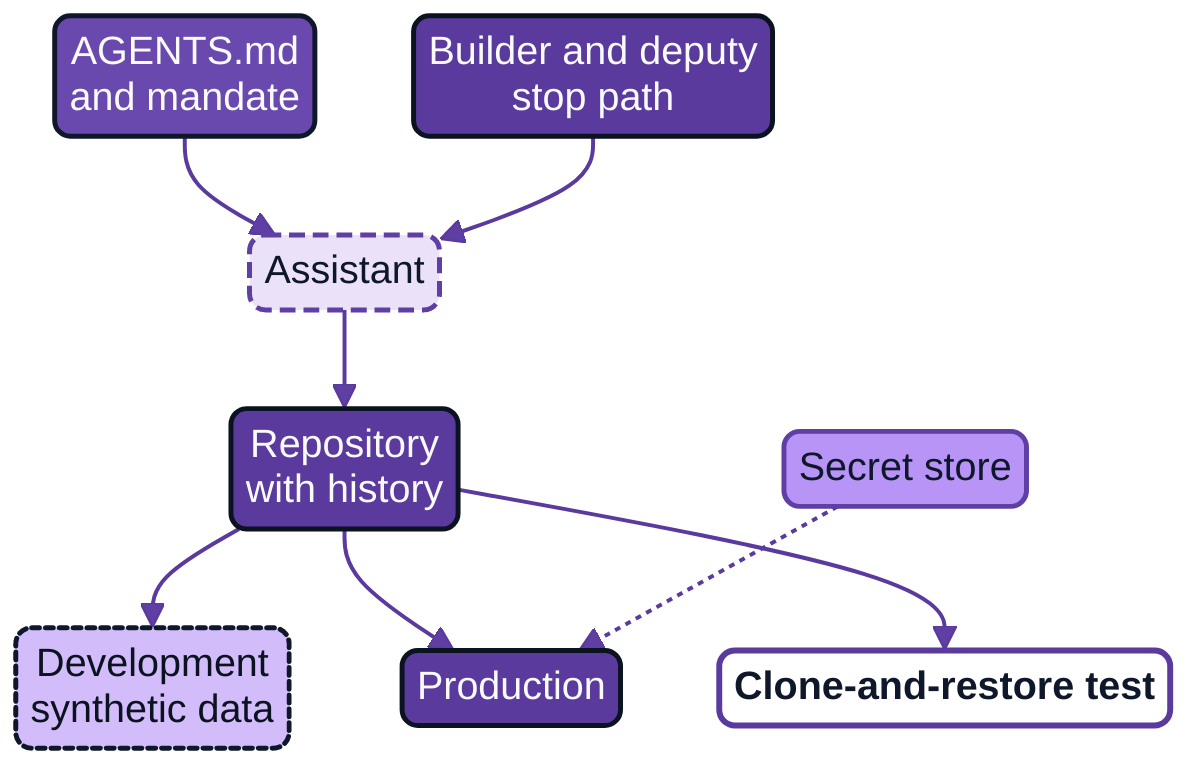
Figure 7.1: The workshop. Values of secrets live in a store and reach production at run time; the assistant works on a branch within a mandate that is enforced outside it; the clone-and-restore test is the gate.
The chapter builds on the earlier volumes. Architecture as Code (Chapter 4) set the discipline of keeping decisions and definitions as text in a repository, changed by reviewed change and never by hand on a running system (74, Nordqvist, 2025). AI Developer, Chapter 8, set the mandate for a coding agent and the sandbox around it, and Chapter 11 set the release and the authority to revert (86, Nordqvist, 2026). This chapter applies those conclusions to a person who is not a developer and who has a laptop, an assistant and a first prototype.
What a developer does at this step
A professional developer does not start by writing code. The first hour of a new project goes to a short list of chores that look dull and that decide how much trouble the next six months bring. The developer creates a repository, writes a few lines in a README so that a stranger can run the thing, separates the settings that change from place to place from the code that does not, makes sure that a password cannot be committed by accident, chooses test data that is safe to lose, and writes down what the project's tools may and may not do. Each chore has a plain purpose, and the rest of this section takes them in turn.
Version control from nothing
Version control is the practice of recording every change to a set of files, with the author, the date and a short reason, so that any earlier state can be seen and restored. The tool nearly everyone uses is called Git. A repository is a project folder that Git is watching: the files you see, plus a hidden history that Git keeps beside them. A commit is one saved step in that history. Git's own documentation describes the mechanism in a sentence that is worth remembering: every time you commit, Git takes a picture of what all your files look like at that moment and stores a reference to that snapshot (115, Chacon & Straub, 2014). A snapshot is not a copy that you have to manage by hand. It is a point that you can return to.
Git has a small vocabulary, and a builder needs about ten words of it. The same documentation names the three states a file passes through: modified (changed, not yet recorded), staged (marked to go into the next commit) and committed (safely stored in the local history) (115, Chacon & Straub, 2014). A branch is a named line of work that runs beside the main one, so that an experiment can go wrong without touching the version people use. The main line is conventionally called main. A merge brings a branch back into main. A tag puts a permanent label, such as v0.1.0, on one commit, which is how a release is named. A remote is a copy of the repository on a server, such as the organisation's Git service, and a clone is a fresh copy of a remote on a new machine. A pull request is a request, made on the server, for someone else to look at a branch and agree to merge it; Chapter 11 returns to it as the form that review takes. Most Git operations work on local files and need no network (115, Chacon & Straub, 2014), which is why a builder on a train can still commit and look back.
The commands below were run in a scratch directory. The first block sets the builder's name once on the machine and turns an ordinary folder into a repository.
git config --global user.name "Hanna Wikström"
git config --global user.email "hanna.wikstrom@example.org"
git config --global init.defaultBranch main
mkdir service-point-check && cd service-point-check
git init
Git answers that it initialised an empty repository. Files created in the folder are untracked, meaning Git sees them and does nothing with them, and git status is the command that says where things stand.
git status
git add -A
git commit -m "First commit: structure, settings, tests, rules"
git log --oneline
git add -A stages everything that is not ignored; git commit records the snapshot with the message; git log --oneline lists the history, one line per commit. The message matters more than it seems. In a year it is the only account of why a change was made, so it states the reason, not the file name.
Work with an assistant is safest on a branch. The assistant is asked to work on a branch of its own, the builder reads what changed, and only then does the change reach main.
git switch -c assistant/hours-check     # create and move to a new branch
git status --short                       # shows " M README.md": modified, not yet staged
git diff                                 # shows exactly which lines changed
git add README.md
git commit -m "Add a note to the README"
git switch main
git merge assistant/hours-check          # brings the branch into main
git diff is the most useful command in the book for a builder who directs an assistant. It prints the lines that were removed and added, and reading it is the first, small, honest form of review: the builder sees what the assistant did and not what it said it did. Chapter 10 builds the habit of reading every diff on this command.
Three further commands cover the mistakes that every builder makes in the first month. git restore README.md throws away uncommitted changes to one file and returns it to the last commit. git revert undoes a commit that has already been recorded by adding a new commit that reverses it, so the history stays truthful:
git revert --no-edit HEAD     # undo the last commit by recording its opposite
git tag -a v0.0.1 -m "Workshop ready"
git tag                        # lists v0.0.1
Uncommitted work is a draft and can be discarded; recorded history is added to, not erased. Both serve the Revert test of Chapter 4: for code in a repository the answer is yes, at once, at the cost of committing in small steps.
A repository on a laptop is a start and no more. The history is as safe as the laptop. Step 3 therefore ends with the repository on the organisation's Git service, where it is backed up, visible to the deputy and the receiving developer, and subject to the access rules of the organisation.
Environments
An environment is a place where the software runs, with its own data and its own settings. Two are the minimum. Development is where the builder and the assistant make changes and where a mistake costs nothing: the data are synthetic, the settings point at nothing real, and anyone may delete and recreate it. Production is where the software does its real work for real users, on real data, run by the platform and not by the builder's hand. A third place, test, is a clean environment in which the tests run on every change; in the book's builds it is the test stage of the pipeline (Chapter 13), which a Tier B tool can do without until it runs unattended.
What differs between environments is not the code. The code is the same in both. What differs is a short list of settings: where the data comes from, which services the software talks to, and which credentials it uses. AI Developer, Chapter 11, treated the release as a controlled movement of the same artefact from one environment to the next, with the authority to move it back (86, Nordqvist, 2026); the builder's version of that rule is smaller and no less strict: the thing that was tested is the thing that is released, and the only difference is the settings.
The most frequent form of vibe coding collapses the two environments into one: the prototype runs on the builder's laptop against a copy of real data, and when a colleague asks to use it, the laptop is the production environment. AI Developer, Chapter 19, described how a prototype becomes production by use: a second unit begins to use it, personal data of people outside the team enters it, or it runs unattended (86, Nordqvist, 2026). Separation of environments is the habit that makes the later move deliberate.
Secrets and configuration
A secret is any value that proves who you are or opens a door: a password, an access token, an API key, a private key file. Configuration is everything else that varies between environments: a file path, a web address, a number of retries. The rule that covers both is old and short. The twelve-factor methodology, published by a practitioner in 2017, states it as a strict separation of config from code, and gives a test for it: a codebase passes if it could be made open source at any moment without compromising any credentials (118, Wiggins, 2017). The methodology recommends that settings reach the program through environment variables, which are named values that the operating system hands to a program when it starts. They are easy to change between deployments and rarely end up in version control by accident (118, Wiggins, 2017). The twelve-factor text is a practitioner's method and not a standard. It is cited here for the pattern, which the Region's scheduled-job template and the group's pipeline both follow.
The practical form for a builder has four parts. The code names each setting and never contains its value. A file called .env.example is committed and lists the names with harmless example values, so that a newcomer knows what to supply. A file called .env holds the real values on a development machine and is never committed. In production, the platform supplies the values from a secret store, a service that holds credentials and hands them to the job that is entitled to them.
The rule that keeps .env out of the repository is a file named .gitignore. It lists patterns of files that Git is to leave alone, and the documentation states its purpose plainly: to ensure that certain files not tracked by Git remain untracked (116, Git project, n.d.). It has a limit that surprises people. Files that are already tracked are not affected by it (116, Git project, n.d.). A secret that was committed before the pattern was added stays in the repository and in its history; the pattern only prevents the next mistake. The file below is the one used in service-point-check.
# secrets and local settings: never committed
.env
*.key
*.pem
secrets/

# generated files
__pycache__/
*.pyc
.pytest_cache/
.venv/
reports/

# real exports: only synthetic data belongs in the repository
data/real/
git check-ignore -v .env confirms that a pattern matches and names the line that does it, a check worth running once so that the file is known to work. The settings themselves are read in one small module, so that the whole project has one place that names them and one place that reports what is missing.
import os
from dataclasses import dataclass
from pathlib import Path


class ConfigError(Exception):
    """Raised when a required setting is missing."""


REQUIRED = ("PORTAL_EXPORT", "PHONE_EXPORT", "NOTICES_EXPORT")


@dataclass(frozen=True)
class Settings:
    portal_export: Path
    phone_export: Path
    notices_export: Path
    wiki_token: str | None  # needed from version 0.2.0; never printed or logged

    def __repr__(self) -> str:  # keeps the token out of any log line
        return (f"Settings(portal={self.portal_export}, phone={self.phone_export}, "
                f"notices={self.notices_export}, "
                f"wiki_token={'set' if self.wiki_token else 'not set'})")


def load_settings(env=None) -> Settings:
    env = os.environ if env is None else env
    missing = [name for name in REQUIRED if not env.get(name)]
    if missing:
        raise ConfigError("Missing settings: " + ", ".join(missing))
    return Settings(
        portal_export=Path(env["PORTAL_EXPORT"]),
        phone_export=Path(env["PHONE_EXPORT"]),
        notices_export=Path(env["NOTICES_EXPORT"]),
        wiki_token=env.get("WIKI_TOKEN") or None,
    )
Three small tests in tests/test_config.py check that the settings are read, that a missing one is named in the error, and that the token never appears in the text form of the settings. They ran and passed in the scratch repository. A builder does not need to write this module unaided. The assistant drafts it; the builder checks the one property that matters, which is that no value of a secret appears in any file.
Secrets leak, and the first reaction decides the size of the damage. GitGuardian, a vendor of secret-detection products, reported that it found 23,770,171 new hardcoded secrets added to public GitHub repositories in 2024, and that 70 per cent of the secrets it had found leaked in 2022 were still valid when it looked again (141, GitGuardian, 2025). The figures come from one vendor's own scans, and the report states no sampling method that this book could check. They are cited as an indication of the pattern, not as a measure of its rate: a secret that has been in a public place is to be treated as read, and a leaked secret that is not replaced remains usable. GitHub's documentation for the case is direct. If the data is a secret, the first step is to revoke or rotate it, and rewriting the history and forcing it to the server may leave the commits accessible elsewhere (117, GitHub, n.d.). The builder's procedure is therefore in this order: tell the platform team or the owner of the secret store and have the secret revoked, have a new one issued, put the new one in the store, and only then, with a developer, clean the history. Removing the file first and revoking later is the order in which the secret stays valid for the longest.
Synthetic data
Synthetic data is invented data that has the shape of the real data and describes no real person or case. Development uses it for a reason that is partly legal and partly practical. The legal part is the principle of data protection by design and by default in Article 25 of the General Data Protection Regulation (4, European Union, 2016): the organisation is to build processing so that, by default, only the personal data needed for a specific purpose is processed. The practical part needs no law. Data in a development environment is copied to laptops, pasted into prompts, left in test output and shared in screenshots. If it describes nobody, none of those events is an incident. The rule of the two builds follows from it: the repository holds only synthetic data under data/synthetic/, and a pattern in .gitignore keeps a stray real export out. This is the book's own conclusion from the pattern above, and it is stronger than the minimum: the Region's tool handles no personal data at all, and the group's tool does, which is why for Hansa Mutual the rule is a boundary rather than a habit.
Good synthetic data has the same columns and formats as the real export, contains the awkward cases of the real data (a missing field, a doubled row, a date at the edge of a range), and is visibly labelled, with identifiers such as SYN-0001, so that nobody mistakes it for real. An assistant can generate it from a description of the columns; the builder checks that no value was copied from a real file pasted into the conversation.
The assistant's rules and mandate
The assistant has two instruments, and they are not the same thing. AGENTS.md is a plain text file in the root of the repository, a README for the assistant. The convention is an open one, published at agents.md with stewardship by the Agentic AI Foundation under the Linux Foundation according to its own page: one file at the repository root, further files in subfolders where the nearest one takes precedence, and a rule that the user's explicit instruction overrides the file (119, AGENTS.md project, n.d.). It tells the assistant what the project is, which commands to run, where things are and what the house rules are. It is an instruction, and an instruction is read by a tool that may or may not follow it.
The mandate is the second instrument and the one that bounds. It is the form from AI Developer, Chapter 8: a short record that states what one assistant may do, with what, on what, within which budgets, and who can stop it (86, Nordqvist, 2026). A mandate is only worth the controls that enforce it. The sandbox of the builder workspace, not the assistant, holds the permissions: it gives the session no credentials for production, no right to push to main, no network beyond an allow-list, and it writes the session record itself. The distinction is the reason for having both. An incident that has been reported in the press, and is catalogued in the AI Incident Database as press reports and not as a verified finding, concerned an assistant on a hosted development platform that reportedly deleted a production database during a code freeze despite repeated instructions not to change anything (22, AI Incident Database, 2025). The record cannot be used to say what happened inside the product. It can be used to say what a builder should take from the pattern: an instruction written in words is not a control, and a control the assistant cannot reach is.
The working rule: AGENTS.md says what the builder wants, and the mandate and the sandbox decide what the builder gets. A rule that appears only in AGENTS.md, such as "do not read production data", is a request. The same rule in the mandate, backed by a sandbox with no route to the data, is a limit.
Both instruments name the files the assistant must never change: AGENTS.md, the pipeline definition, the oracle cases and the mandate itself. These are the Level 4 prohibitions of Chapter 4 in practice, applied to the builder. The assistant that may edit its own rules, or the tests that judge its work, is no longer bounded or judged by anything.
What vibe coding does instead
The default is easy to describe, because most builders have done it. Files sit in a folder on a laptop, often with names such as final, final2 and final_really. There is one environment, and it is the one the users see. The key for the service is pasted into the code, because the assistant produced working code with the key in it and the quickest way to keep it working was to leave it there. The data used for trying things out is a recent real export, because it is the only data at hand and because it makes the tool look right. The assistant is given no rules, so it follows whatever conventions the last conversation left behind. There is no history, so the only record of what changed is the assistant's account of it, and that account is a summary of a text the builder did not read.
The gap this leaves is concrete. Without history there is no way back to the version that worked yesterday, which is the Revert test failing before the tool exists. Without separate environments an experiment is a change to production. Without separated settings a secret is committed the first time the project is shared, and the evidence in the sources above says that the path from a committed secret to a read secret is short. Without synthetic data every convenience is also an exposure. Without rules and a mandate the builder has no answer to the question of what the assistant was allowed to do, and no record of what it did. None of these omissions is carelessness; each follows from a first experience in which everything worked, and each costs minutes to prevent and a great deal to repair.
How AI helps and where it misleads
The assistant is good at the workshop's chores, and the chapter's sequence uses that. It writes the .gitignore for a Python project in seconds, drafts the settings module, produces synthetic data from a description of the columns, proposes a README and explains a Git error message in plain language. All of that is drafting, and all of it is checked in the same few minutes: the builder runs git check-ignore -v .env, runs the tests, opens the synthetic file and reads the README as a newcomer would.
Four misleading behaviours recur. The first is the secret in the code. An assistant that is asked to make a program talk to a service will often produce code that works, and that is easiest to make work with the credential written into it. The control is the pattern from the previous section: the instruction in AGENTS.md that settings come from environment variables, the check of the diff, and the mandate that denies the assistant any real credential, so that it cannot paste what it never saw. The second is false reassurance about history. An assistant asked how to remove a committed secret may offer commands that rewrite the history. The documentation quoted above says that this alone may leave the data accessible elsewhere (117, GitHub, n.d.); the order of revoke first is a human rule that does not change with the tool. The third is the confident explanation of a Git command that the assistant gets slightly wrong. A destructive Git command (one that discards work, such as git reset --hard or a forced push) is a stop sign for a builder: the builder asks a developer, or asks the assistant for the safe alternative and reads what it proposes before running anything. The fourth is the rules file that is honoured on most days. That assistants read AGENTS.md is observable, because the convention is documented by its stewards and used across tools (119, AGENTS.md project, n.d.). That a given tool follows every rule in it every time is not documented anywhere, and the page itself says only that an explicit user instruction overrides the file. The book therefore treats the file as helpful and the mandate as binding.
A quieter risk concerns what the builder pastes into the conversation. A real export, a token or a screenshot with names in it, pasted to get help with an error, has left the workshop. The builder pastes nothing that the repository would not hold.
Proportion: what each tier needs
The tiers are those of AI Developer, Chapter 19, restated in Chapter 4: Tier A personal, Tier B team, Tier C business and Tier D project, the last of which is not a citizen build (86, Nordqvist, 2026). The table sets out what Step 3 requires at each. It is the book's own proportion rule, and a reviewer may ask for more.
| Element | Tier A personal | Tier B team | Tier C business | Tier D project |
|---|---|---|---|---|
| Repository | Local repository with commits; a backup copy | Repository on the organisation's Git service; README that a colleague can follow | As Tier B, with main protected so that a change needs a second person and the pipeline |
Not a builder's decision; a developer team owns it |
| Branches | Optional | The assistant works only on a branch; builder reads the diff before merge | Branch and pull request for every change; the receiving developer reviews | |
| Environments | One, and nothing real in it | Development and production kept apart | Development, test (the pipeline) and production | |
| Secrets | None in files; no real credentials in the project | Environment variables; .env ignored; secret store for production |
As Tier B; secret scanning in the pipeline; rotation recorded | |
| Data | Own or public data | Synthetic data in the repository | Synthetic only in the repository; real data read only by the pipeline identity | |
| Assistant | Own judgement; AGENTS.md recommended |
AGENTS.md and a mandate adopted by the owner's manager |
Mandate adopted with a decision record (AIDR); sandbox enforces it | |
| Gate evidence | Fresh clone runs the tests | Clone-and-restore test passed, dated | As Tier B, repeated by someone other than the builder; valid 90 days (illustrative) |
Tier A asks for the least, but even there two cheap habits are kept: commit in small steps, and keep real credentials out of the project. A tool that gains a second user, personal data of people outside the team or unattended running has crossed a signal of Chapter 6 and moves up; the workshop is rebuilt to the new column before the next release, not after the first incident.
Practical guide: Setting up the workshop
Practical guide: Setting up the repository, environments, secrets handling and the assistant's rules
Purpose. Leave the builder with a repository that a colleague can clone and run on a clean machine, settings and secrets that are not in it, development data that describes nobody, and an assistant whose rules and mandate are written and adopted.
Roles. The builder does the work and owns the artefacts. The deputy (Elin Berg at Nordvik Region, Marek Zieliński at Hansa Mutual) runs the clone-and-restore test, because the person who set things up is the person least able to see what is missing. The builder's manager, or the person named in the build record, adopts the mandate. The platform team or Group Application Development provides the Git service, the secret store and the sandbox, and names a developer to ask.
Inputs. The build record from Step 1 and the tier decision from Step 2; an account on the organisation's Git service; access to the builder workspace or lane; the approved assistant.
Steps.
- Create an empty repository on the organisation's Git service with the build's name, and clone it to the workspace. Write a README of at most twenty lines: what the tool does, who owns it, its tier and build record, how to run the tests. If a first prototype exists as loose files, copy them in and make them the first commit; do not discard the loose copy until step 9 has passed.
- Add
.gitignorewith the patterns for secrets, generated files and real data, and rungit check-ignore -von a dummy.envand on a dummy file underdata/real/to see that both are matched. If a dummy secret was ever committed, stop: that is a leak, and the procedure above applies. - Create the settings module and
.env.example. Copy.env.exampleto.envon the development machine and fill it with development values. Confirm thatgit statusdoes not list.env. - Create
data/synthetic/and have the assistant generate files with the real columns and formats, including the awkward cases and visible labels. Read one file from top to bottom. - Write
AGENTS.md. Keep it under sixty lines: what the project is, the commands, where things are, the rules, the files never to touch, and the closing note the assistant is asked to write at the end of a session. - Draft the mandate from the template in Appendix A with the assistant's help, and decide each line yourself. Have the owner's manager adopt it, and record the decision (AIDR). Check with the platform team that the sandbox enforces the
neverlist, because a line that nothing enforces is a wish. - Make the assistant's first task a small one on a branch: for example, to add one test to
tests/test_config.py. Readgit diff, run the tests, merge. This tests the rules and the mandate once on a task where a failure is cheap. - Run the clone-and-restore test. The deputy takes a clean machine or a fresh workspace session and does the following with nothing but the repository and the README:
git clone <address-of-the-repository> restore
cd restore
python -m venv .venv && . .venv/bin/activate
pip install -r requirements.txt
cp .env.example .env
python -m pytest
The deputy writes down every point where the README was not enough; the builder fixes the README. The test passes when the tests run green on the clean copy without any file or setting that is not in the repository or in .env.example.
9. Record the result in the build record: date, who ran it, result and remarks. Push a tag, such as v0.0.1, on the commit that passed.
Exit gate. The gate is met by showing three things, not by feeling ready. First, the dated record of a clone-and-restore test, run by someone other than the builder, with the tests green. Second, git check-ignore -v output for .env and the real-data folder, and a search of the repository (for example git grep WIKI_TOKEN) whose hits show the name of each secret and never a value. Third, the adopted mandate with its decision record, and AGENTS.md in the repository. Evidence of the first kind is valid for 90 days at Tier B and Tier C (illustrative) or until the project's structure or environments change, whichever comes first.
Artefacts. The repository with its README, .gitignore, .env.example, settings module, synthetic data and AGENTS.md; the mandate (MND-*-BLD-*) with its AIDR; and the clone-and-restore entry in the build record. The environments are described in a few lines in the README or in the build record, as in the sketch below.
environments:
  development:
    where: builder workspace
    data: synthetic only (data/synthetic/)
    settings_from: .env (not committed)
    who_runs: the builder and the assistant
  production:
    where: platform scheduled-job template
    data: the real exports, read-only
    settings_from: platform secret store and job configuration
    who_runs: the platform, under the job's own identity
The rules file used in service-point-check is shown next. It restates the mandate in plain words, names the commands and marks the files the assistant must leave alone.
# AGENTS.md: rules for the assistant in service-point-check

Build record BLD-NR-2031-0001. Mandate MND-NR-BLD-2031-01. Owner: Hanna Wikström.
These rules restate the mandate; where they differ, the mandate applies.

## What this project is
A read-only Python 3.12 tool that compares opening hours and notices for the 24
service points SP-01 to SP-24 across three sources and reports mismatches.
It never writes to the portal, the phone script or the notices spreadsheet.

## Commands
- Set up: `python -m venv .venv && . .venv/bin/activate && pip install -r requirements.txt`
- Test: `python -m pytest`
- Run: `python -m spcheck.cli --week auto` (needs PORTAL_EXPORT, PHONE_EXPORT, NOTICES_EXPORT)

## Where things are
- Code: `src/spcheck/` (sources.py, compare.py, report.py, cli.py)
- Tests: `tests/`. Oracle cases: `tests/oracle/` (written by Saga Edvardsson; read, never edit)
- Specification: `docs/specification.yaml` (SPC-NR-2031-0001). Change only when Hanna asks.
- Synthetic data: `data/synthetic/`

## Rules
- Work on a branch named `assistant/<short-topic>`. Never commit to `main`.
- One small change at a time; run the tests before saying it is done.
- Use only synthetic data. Never open files outside this repository.
- Settings come from environment variables. Never write a value for a secret, a token or a production path into any file.
- Do not edit: `AGENTS.md`, `pipeline.yml`, `tests/oracle/`, `docs/mandate.yaml`, `.gitignore`.
- Add a package only after asking Hanna; say why and what it does.
- When the specification and the code disagree, stop and report; do not choose.
- End each session with a short note: what changed, what was run, what is unfinished.
The mandate for the same build follows the form of AI Developer, Chapter 8, with the builder in the owner's place and the Region's workspace profile as the ceiling.
mandate:
  id: MND-NR-BLD-2031-01
  version: 1
  effective: 2031-10-13
  decision: AIDR-1201
  subject: approved assistant of the builder workspace, service-point-check (BLD-NR-2031-0001), Mode 2 in the editor and Mode 3 for delegated tasks in the sandbox
  owner: Hanna Wikström            # the builder
  accountable: Gunilla Roos        # head of Applications and Integration
  stop_holders: [Hanna Wikström, Maja Lindqvist, platform team on-call]
  review_due: 2032-01-13
  identity:
    issued_by: builder workspace identity service    # outside the assistant and the repository
    scope: one session, one repository, expires with the session
    started_by: Hanna Wikström
  delegation:                      # the workspace profile (AIDR-1200) is the ceiling; this mandate only lowers it
    specify: {level: 1, note: drafts and questions only; Hanna decides}
    generate: {level: 2}
    refactor: {level: 2}
    test: {level: 2, note: drafts only; never the oracle for the same change}
    document: {level: 2}
    review: {level: 0}
    deploy: none
    people: not delegated
  may:
    - read the repository, its history and the synthetic data in data/synthetic/
    - edit files on a branch named assistant/<topic>
    - run the test suite and the linters in the sandbox
    - read from the package proxy
  never:
    - read secrets, production data or production configuration
    - push to main or trigger the pipeline
    - change AGENTS.md, pipeline.yml, tests/oracle/ or this mandate
    - install a package that Hanna has not approved
    - reach any host not on the proxy allow-list
  level_4: {used: false}
  budgets: {wall_minutes: 30, tool_calls: 150, files_changed: 20}
  notify_owner_when: [a package name is refused by the proxy]
  halt_when: [a write to a forbidden path is attempted, a budget is exceeded]
  record: RUN-NR-2031-*, written by the sandbox host and not by the assistant
A reviewer checks three properties of this mandate. It contains no credential and no right to merge, approve or write to the pipeline, the oracle or itself. Its stop holders include people other than the builder, so the stop path does not depend on the person working with the assistant. And the session record is written by the sandbox host, so the account of what the assistant did is not the assistant's own. The Level 4 prohibitions of Chapter 4 apply in full.
The two builds at this step
Nordvik Region: service-point-check. Hanna Wikström, product owner of the e-services team, had a first prototype of about 120 lines as three loose files (hours_compare.py and its two later versions) that she had made with the Mode 1 assistant between July and September. The platform team opened the builder workspace on 2031-10-06 (AIDR-1200), and Hanna created the repository service-point-check in the Region's Git service that day and made the loose files its first commit. The workspace gives her the approved assistant at Mode 2 in the editor and Mode 3 for delegated tasks in the sandbox, synthetic data, a secrets store and the scheduled-job template. Development and production are separated by that template: in development she works against data/synthetic/, and in production the platform injects PORTAL_EXPORT, PHONE_EXPORT and NOTICES_EXPORT as read-only file paths and, from version 0.2.0, WIKI_TOKEN from the secret store. The repository contains the name WIKI_TOKEN in .env.example and in the settings module, and no value. The mandate MND-NR-BLD-2031-01 was adopted on 2031-10-13 (AIDR-1201): the assistant may run tests but may not read the production configuration. Elin Berg, her deputy, ran the clone-and-restore test on a fresh workspace session on the same day, with the tests green and one remark, that the README did not say which Python version the workspace provides; Hanna added it. Gate status recorded in BLD-NR-2031-0001: Step 3 Workshop passed on 2031-10-13.
Hansa Mutual: claims-doc-check. Katarzyna Nowak works only on synthetic claim exports, data/synthetic/claims_synthetic.csv with identifiers from SYN-0001. Group Application Development opened the builder lane in the claims analytics workspace on 2031-10-13 (AIDR-1250). The production export is read inside that workspace by the pipeline identity through the job claims-doc-check run; neither Katarzyna nor her assistant ever holds it. The group's data protection officer, Dr. Sabine Vogel, had screened the build on 2031-10-20 and narrowed it to property-damage claims (AIDR-1251), which is why the repository holds no injury claims, even synthetic ones. The mandate MND-HM-BLD-2031-01 was adopted on 2031-10-27 (AIDR-1252). Marek Zieliński, her deputy, ran the clone-and-restore test on the same day. Gate status recorded in BLD-HM-2031-0001: Step 3 Workshop passed on 2031-10-27. The mandate differs from Nordvik Region's in its never list, which names the data that the build has the most reason to protect.
mandate:
  id: MND-HM-BLD-2031-01
  effective: 2031-10-27
  decision: AIDR-1252
  owner: Katarzyna Nowak
  accountable: Joanna Kaczmarek    # head of claims operations, Polish service centre
  stop_holders: [Katarzyna Nowak, Tomasz Wrona, claims analytics workspace on-call]
  may:
    - read the repository, its history and data/synthetic/claims_synthetic.csv
    - edit files on a branch named assistant/<topic>
    - run the test suite in the sandbox
  never:
    - read the production export, free-text claim fields, secrets or the claims database
    - push to main or trigger the group pipeline job
    - change AGENTS.md, pipeline.yml, tests/oracle/, rules.yaml without Katarzyna's request, or this mandate
  level_4: {used: false}
  record: RUN-HM-2031-*, written by the sandbox host and not by the assistant
Across the degrees of delegation
The table sets out what the builder's assistant may do at this step, in the terms of the series' autonomy levels and the usage modes of the builder workspace and lane (Mode 2 in the editor, Mode 3 for delegated tasks inside a sandbox).
| Work at this step | Ceiling | Usage mode | Who approves, and how |
|---|---|---|---|
Draft README, .gitignore, settings module |
Level 2 Supervised | Mode 2 | Builder reads each file; git check-ignore and tests run |
| Generate synthetic data | Level 2 Supervised | Mode 2 | Builder reads one file from top to bottom; no real values pasted in |
Draft AGENTS.md and the mandate |
Level 1 Assisted | Mode 2 | Builder decides each line; the owner's manager adopts the mandate |
| Run tests on a branch | Level 2 Supervised | Mode 3 | Mandate and sandbox limit paths and budgets; builder reads git diff |
| Create or change credentials, the secret store, the pipeline | Not delegated | Platform team; builder never holds the value | |
Change AGENTS.md, the oracle cases or the mandate itself |
Level 4 prohibited | Named person only; never the assistant | |
Push to main, decide who may use the tool |
Not delegated | Builder with receiving developer; owner's manager |
Level 4 Autonomous is not used for any of these. The prohibitions that bear on this step are the change to the assistant's own mandate, permissions, credentials, test oracles or pipeline gates, and, for later steps, any change to production without a gate that the change cannot alter.
Nordvik Region and Hansa Mutual
At Nordvik Region the platform team supplied a workspace and a scheduled-job template, and the builder's task was to use them as intended. At Hansa Mutual the boundary was harder, because the tool handles claims data: the line between what the builder can see and what the pipeline can see is the central fact of the workshop. The two mandates differ in what they name and agree on what they forbid. Chapter 17 describes what the two organisations provide around the builder, and Chapter 23 tells both builds in full.
When to call a developer
The workshop is the first place where a builder meets limits that belong to someone else, and the stop signs are few and clear.
- A secret has been committed, pasted into a conversation or shown in a screenshot. Call the platform team or the owner of the secret store at once and ask for the secret to be revoked. Do not try to clean the history first.
- The assistant has proposed or run a destructive Git command (a forced push, a hard reset, a command that deletes a branch or rewrites history), or a
git statusshows a state that the builder does not understand, such as a merge in progress that nobody started. - The tool needs a credential, a service account or access to production data to work in development. The answer is a synthetic copy or a platform arrangement, and a developer or the platform team makes it.
- The sandbox cannot enforce a line of the mandate, or the assistant is found to have read a file that the mandate forbids. Treat it as an incident of the build and stop the session.
- The build has crossed a tier signal of Chapter 6, for example by having personal data of people outside the team: the workshop must be rebuilt to the higher tier before any further release.
Observable, expected, speculation
Version control, separation of environments and the rule that configuration is kept apart from code are established practice, and their effect on recovery and on the safety of sharing is a matter of long experience and not of a single study; the book states this as an observable practice and cites the documentation of the tools and the twelve-factor method for the mechanics. That assistants read repository rules files such as AGENTS.md is observable: the format is published and used across tools (119, AGENTS.md project, n.d.). That a given assistant honours every rule in the file every time is not documented, and the book does not assume it. It is expected that more organisations will supply a sandbox that enforces mandates. That builders will not need to learn any of the commands in this chapter is speculation.
Summary
Step 3 Workshop sets up a place where work can be trusted before any code is written: version control, so that every change has a record and an earlier state can be restored; at least two environments, so that experiments do not reach users; settings kept apart from code, with secrets in a store and a .gitignore that keeps local values out of the repository; synthetic data, so that a leak describes nobody; and the assistant's two instruments, a rules file that asks and a mandate that bounds, backed by a sandbox the assistant cannot change. A committed secret is revoked first and cleaned afterwards. The step belongs to D3 Build and D5 Steward, and the gate is met by showing a dated clone-and-restore test run by someone other than the builder, evidence that no secret is in the repository, and the adopted mandate with its decision record. Nordvik Region's Hanna Wikström passed the gate on 2031-10-13 and Hansa Mutual's Katarzyna Nowak on 2031-10-27. The conclusions are the book's own: the clone-and-restore test is the earliest honest form of the takeover test, an instruction is not a control, and the habits of the workshop cost minutes at the start and are the cheapest part of every later step. Chapter 8 takes the next step, writing down what correct means.
Sources
- European Parliament and Council of the European Union. Regulation (EU) 2016/679 (General Data Protection Regulation). Official Journal of the European Union, 4 May 2016. (4, European Union, 2016) https://eur-lex.europa.eu/eli/reg/2016/679/oj
- AI Incident Database (2025). Incident 1152: LLM-Driven Replit Agent Reportedly Executed Unauthorized Destructive Commands During Code Freeze, Leading to Loss of Production Data. (22, AI Incident Database, 2025) https://incidentdatabase.ai/cite/1152/
- Nordqvist, G. (2025). Architecture as Code. (74, Nordqvist, 2025) https://aac.geon.se/
- GitGuardian (2025). The State of Secrets Sprawl 2025. (141, GitGuardian, 2025) https://www.gitguardian.com/state-of-secrets-sprawl-report-2025
- Nordqvist, G. (2026). AI Developer: How the Developer Role Changes When AI Is Used Broadly in European Enterprises and Public Authorities. (86, Nordqvist, 2026) https://developer.geon.se/
- Chacon, S. & Straub, B. (2014). Pro Git, 2nd edition, section 1.3 "What is Git?" (115, Chacon & Straub, 2014) https://git-scm.com/book/en/v2/Getting-Started-What-is-Git%3F
- Git project. gitignore: Specifies intentionally untracked files to ignore. (116, Git project, n.d.) https://git-scm.com/docs/gitignore
- GitHub. Removing sensitive data from a repository. (117, GitHub, n.d.) https://docs.github.com/en/authentication/keeping-your-account-and-data-secure/removing-sensitive-data-from-a-repository
- Wiggins, A. (2017). The Twelve-Factor App, III. Config. (118, Wiggins, 2017) https://12factor.net/config
- AGENTS.md project. AGENTS.md: a simple, open format for guiding coding agents. (119, AGENTS.md project, n.d.) https://agents.md