Step 5 Design: Choose Boring Technology and Record Decisions
Between a specification and the first line of code there is a short stretch of work that professional developers treat as separate and that vibe coding skips: deciding what the software will be made of, where its data will live, who may touch it and what it will cost to keep and to leave. This chapter teaches that work. It concerns Step 5 Design, and behind it the developer function D2 Design, the choice of constraints: architecture, interfaces, data, security by design, decisions and their records. Its method is plain. The builder prefers technology that the organisation already runs and that a named developer could maintain, decides where data lives and who can reach it, writes down three to five decisions in short records, and ends with a one-page design that a reviewer can read in ten minutes.
The chapter builds on the way AI Developer, Chapter 6, treats design as the choice of constraints and records the reasons for each, on the way AI Developer, Chapter 16, places the platform engineer who owns the paved road a builder should stay on, on Architecture as Code (Chapter 4), which introduces the Architecture Decision Record, and on The Transformed Security Architect, Chapter 5, which treats boundaries as something designed before they are enforced (86, Nordqvist, 2026). It assumes that Step 4 Specification is finished: the builder has a specification record that says what correct means and what the tool must never do.
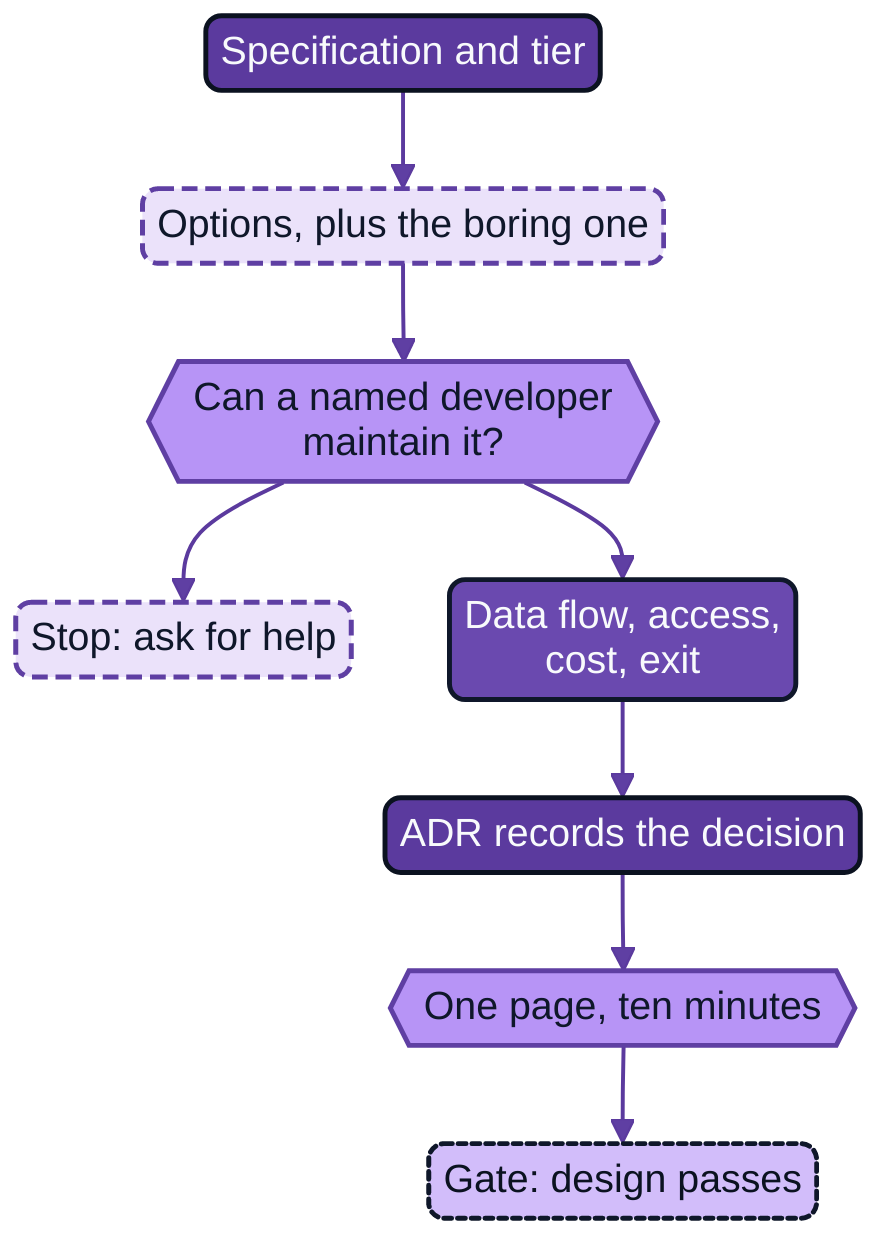
Figure 9.1: Design decisions, with the human decision points and the assistant's part recorded.
The figure shows the order of work. The specification and the tier come first. The assistant is asked for options, and the builder adds the one the assistant tends not to offer, which is whatever the organisation already runs. The first gate is a question about people, not technology: can a named developer maintain this? If not, the builder stops and asks the platform team. If so, the data flow is drawn, access, accessibility, language, cost and exit are settled, the decisions are written as records, and a reviewer reads the page. The gate is met when the design record and the decision records pass a small automated check and the reviewer has signed.
What a developer decides before building
A developer who is handed a specification does not start typing. A developer first reduces the number of ways the software could be built, because every open question left to the moment of coding is answered by whoever happens to be at the keyboard, and the answer is rarely written down. The questions are few. What language and libraries will it use, and does the organisation already have people who know them? Where will it run, and who patches that place? Where does its data come from, where is it kept, and who can read or change it? What does the tool need permission to do, and what must it be unable to do? Who will use it, in which language, and with which assistive technology? What does it cost to run for a year, and what does it take to stop using it?
These are constraints, and a good set of them is short. AI Developer, Chapter 6, describes five kinds that a design review should ask about: boundary, interface, data, failure and decision. A builder at this step does not need the full vocabulary. Three habits carry most of the benefit: choose from what the organisation already supports, draw where the data goes, and write down the reason for each choice while the reason is still remembered.
Writing the reason down is the part that is skipped most often and that matters most to the colleague who will inherit the software. Nygard argued in 2011 that a team should keep short records of architecturally significant decisions, each with a title, a status, the context that forced the decision, the decision itself and its consequences, kept in the project's repository and numbered so that a superseded decision stays findable. He gave the reason in terms any builder will recognise: a new team member who meets a past decision with no rationale can only accept it blindly or reverse it blindly (44, Nygard, 2011). The takeover test of Chapter 4, in which a named colleague must be able to change the software in a working day, depends on exactly this. A colleague can change a thing safely only if the reasons that constrain the change are on record.
What vibe coding does instead
Vibe coding makes design decisions by default. The assistant is asked for an application and returns one, and in doing so it selects a language, a framework, a database, a hosting arrangement and an authentication method. None of those was a decision in the sense of this chapter. Nobody weighed an alternative, nobody asked who would maintain the result, and nobody wrote the reason down, because there was no reason beyond the fact that the assistant produced it. The choice is real, because the application now depends on it, but it was not made by anyone.
The consequences are predictable and are visible in what has been measured about applications built this way. A 2026 preprint collected 9,041 open-source applications built with two coding assistants and audited 200 publicly deployed ones. It reported 1,186 vulnerabilities, with 91.0 per cent of the audited applications holding at least one and 65.77 per cent of the vulnerabilities rated Critical or High, concentrated in broken access control, injection and authentication failures (109, Deng et al., 2026). The paper is not peer reviewed, the applications were public ones and the sample is not a sample of citizen builds in European organisations, so it supports no figure for the reader's own tool. It does support the narrower point that the defaults an assistant picks for who may read and change data are not a safe place to leave a decision.
Hosting by accident is the other common outcome. A prototype that works on the builder's laptop is moved to whatever free service the assistant suggested, with a database nobody else can see and a login nobody else administers. Chapter 6 introduced the tier as the measure of how much structure the work needs. This chapter shows what the tier implies for the choice of place: a Tier A tool may run where its maker runs it; a tool at Tier B or C runs where the organisation can see it, patch it and switch it off.
How AI helps and where it misleads
The assistant is useful at this step in three ways. It lists options quickly, including ones the builder had not heard of. It explains the trade-offs of each option in plain language when asked. It drafts the text of a decision record from notes. A study of whether language models can write the Decision section of an Architecture Decision Record from its Context found that GPT-4 produced relevant and accurate decisions without examples, and that results were not at the level of human decision-makers (92, Dhar et al., 2024). That is a reason to use the assistant as a drafter of the record and a reason not to let it be the decider.
It misleads in two predictable ways. The first is that its options are weighted by what is common in its training material, not by what the builder's organisation can maintain. A popular web framework, a managed cloud database and a serverless function will appear as the sensible default whether or not the organisation has anyone who can patch them. The second is that it presents its own preference with the same fluency as a fact. A builder who asks "which database should I use?" will receive an answer, not a question about who will keep the database running. The remedy is to give the assistant the constraints first and to ask it to argue against its own proposal.
A request that works well at this step is an ordinary instruction:
Here is the specification (docs/specification.yaml) and the list of what the
platform team already supports (docs/platform-supported.md). Propose two
designs that use only what is on that list. For each, say what data it stores,
what it needs permission to do, who in the organisation would maintain it and
what it would cost to stop using it. Then argue against your own first choice.
Do not write any code.
The platform list is the builder's most useful input, and the first thing to ask the platform team for if the organisation has no such list. Nothing in the answer is accepted until the builder has checked it against a person: the platform team for hosting, the data protection officer for personal data, and a developer for the maintenance test.
Boring technology
The most useful rule of thumb for this step has a name. In 2015 Dan McKinley published an essay, "Choose Boring Technology", that proposed treating a team's capacity for novelty as a small budget. In his model every company gets about three innovation tokens, each new and unproven technology spends one, and the supply stays mostly fixed for a long time (121, McKinley, 2015). He calls the model approximate and the tokens a fictional construct, and the point survives that: the cost of technology is paid mostly after adoption, as the work of living with it, and boring technology is simply the kind whose failure modes are already known. His talk version puts it as a preference for technology that is well understood, with failure modes that are known, and for things that let attention stay on what matters.
For a builder the rule needs one adjustment. The essay is addressed to engineering teams with a mission, which can reasonably decide to spend a token on something that gives them an edge. A builder's mission is almost never the technology. It is the opening hours or the claims file. A builder should therefore expect to spend no tokens at all, and the sensible definition of boring is local: what the organisation already runs, monitors and patches, and what a developer in the organisation could pick up in a day. In practice that is the platform's template, the low-code platform the organisation licenses, the group's pipeline, the wiki the team already reads, the language its developers already write. AI Developer, Chapter 16, calls the organisation's supported route the paved road. A builder who stays on it gains the monitoring, the patching and the support that the platform team already provides, and the builder's receiving developer later inherits something familiar.
The test is a question that can be answered with a name: who, by name, will patch this when a vulnerability is announced in one of its libraries? If the answer is "the platform team" or "the group pipeline", the choice is boring in the useful sense. If the answer is "the assistant can regenerate it", the choice fails the test, because the assistant does not hold a duty and cannot own the software (the stewardship principle of Chapter 4).
A small stack is also a smaller thing to explain. At version 0.1.0 neither build in this book has a runtime dependency beyond the Python standard library, a YAML parser and a test runner. That is a design choice recorded in the decision records below, and it is the reason a new developer can read the whole tool in an afternoon.
Data and access
Data is the part of the design that causes harm if it is wrong, so it is the part to draw. Draw one picture, on one page, of where data comes from, where it is stored and where it goes, with the people and systems that can read or change it at each point. For a small tool this is a few boxes. It need not be a diagram for the reviewer to read it; a list of lines such as the one below does the same work and can be versioned and checked.
portal.json  --->  service-point-check  --->  wiki page "Service point check"
phone.csv    --->  (reads, compares)          (written with WIKI_TOKEN)
notices.csv  --->  never writes back to the three sources
Three questions follow from the picture. The first is the class of data. If the tool touches personal data, the design says which data, why it is necessary and how long it is kept. The General Data Protection Regulation (GDPR), Article 25, requires a controller to implement suitable technical and organisational measures, designed to put data-protection principles such as data minimisation into effect, when it decides how to process and during processing, and to ensure that by default only the personal data necessary for each specific purpose is processed, with respect to the amount collected, the extent of processing, the storage period and the accessibility of the data (4, European Union, 2016). Article 25 also says that personal data must not by default be made accessible to an indefinite number of people without the individual's intervention. This is the organisation's duty, not the builder's, and it is stated here as an architectural implication, not as legal advice. For the builder it means: collect the columns the tool needs and no others, and do not write a copy anywhere that more people can read than needed the original. The Hansa Mutual build below applies this by reading a CSV with five columns and no free text.
The second question is who may do what. The tool and the people who use it each get the least permission that lets the work be done, a principle that Saltzer and Schroeder set out for protection mechanisms in 1975 together with the rule that the default should be to deny and to grant by permission (54, Saltzer & Schroeder, 1975). Applied to a builder's tool this has three concrete forms. The tool has its own identity and its own credential, never the builder's personal one. The credential can read the inputs and write the single place the output goes, and nothing else. The assistant has no access at all to production data or to production credentials, which is also what the builder mandate says (Chapter 7). Secrets reach the tool at run time from the platform's secret store and are never in the repository.
The third question is where data must not go. A design states, in a line each, what the tool never does with data. Both builds in this book carry such lines in their specifications and repeat them in the design, because a reviewer should not have to open a second file to learn the limits: the Nordvik tool never writes to the portal, the phone script or the notices sheet, and the Hansa tool never reads free-text fields and logs nothing but claim identifiers.
Accessibility, language and usability
Builders tend to treat accessibility as a polish step. It is a design decision, cheapest at this stage and expensive afterwards, and for some tools it is also a legal duty of the organisation. Directive (EU) 2016/2102 requires Member States to ensure that public sector bodies take the necessary measures to make their websites and mobile applications more accessible by making them perceivable, operable, understandable and robust (Article 4), and to publish an accessibility statement (Article 7). Its scope excludes content of intranets and extranets published before 23 September 2019, until the site undergoes a substantial revision (Article 1(4)(g)), so a new internal tool of a public body is not outside the Directive merely because it is internal (11, European Union, 2016). The European Accessibility Act, Directive (EU) 2019/882, sets accessibility requirements for a list of products and services that economic operators place on the market, which in the main means offerings to consumers, so it will rarely reach a tool built for colleagues but may reach a service offered to the public (14, European Union, 2019). Where either applies, the question belongs to a developer and to the organisation's accessibility lead, and the builder's step is to ask early. National law transposes the first Directive and may add duties.
The practical technical reference for web content is the Web Content Accessibility Guidelines (WCAG) 2.2, a W3C Recommendation that organises its success criteria under the same four principles and defines conformance at three levels, A, AA and AAA (19, World Wide Web Consortium (W3C), 2024). A builder does not read the guidelines. A builder asks the assistant to check a page against them, then asks a person to use the page with a keyboard only, and with a screen reader if one is available. The reason for both is a limit of the tools. Automated checks find only part of the failures a person would find, and the annual WebAIM survey of one million home pages found detectable WCAG 2 failures on 95.9 per cent of them, with low-contrast text, missing alternative text and missing form labels the most common (159, WebAIM, 2026). Pages built by assistants are not shown by that survey to be better or worse, and the survey does not claim to measure them. It shows that the baseline is poor and that the failures are mundane, which is a reason for the habit.
The habits that cost almost nothing are these. Use headings in order and plain tables. Never let colour be the only signal: a status is written as a word as well as coloured. Give every form field a label. Keep the text short and in the language of its readers, and keep the language of the interface and the language of the generated text as separate settings, since Hansa Mutual's draft requests go out in Polish, German or English according to the claimant. These are decisions to record, and the one-page design has a line for each.
Cost and exit
Cost has two parts and builders usually see only the first. Running cost is what the tool consumes: platform capacity, licences, a paid model if one is called at run time, and the time of the people who watch it. For the two builds in this book running cost is nil beyond the platform's existing capacity, which is itself a consequence of choosing boring technology. The second part is the cost of the builder's own time and, if the assistant is billed by use, of the assistant, which Chapter 10 returns to.
Exit is the question of what it takes to leave. A tool that depends on a single provider's proprietary service, or on a model that can change without notice, is harder to leave than a Python script that reads three files. The design states, in a line, how the tool would be stopped and what would be lost, and, in a second line, what would have to be rebuilt if a platform or model it depends on disappeared. Both builds use this line to say that the repository can be deleted and that the output keeps its last report. For a tool that does call a model at run time, the line also names which model, which data it receives and what the tool does when the model is unavailable.
Architecture decision records
Three to five decisions are enough for a small build. The ones to record are those that a later reader would otherwise have to guess, or that someone is likely to reverse without knowing why: where it runs, what it may and may not touch, what stack it uses and what it deliberately does not, how the output is published. Each is a short file in docs/adr/, numbered in order and never renumbered.
The record used in this book is Nygard's, with two additions that follow from the book's rules. One is a section that names the assistant's part: what the assistant proposed and what the builder decided. That makes the stewardship principle visible, since the record shows who decided. The other is a review date, because the evidence that a decision still holds expires like any other evidence (rule 21 of the authoring guide; this book uses 90 days for evidence about a running tool, and the review date for a decision about a design is set at the same interval so that one routine covers both). The Nordvik build's first record reads:
# 0001 Use the platform's scheduled-job template

Status: accepted (2031-10-20)
Decider: Hanna Wikström, with Anders Falk's team as reviewer

## Context
The tool must run weekly without Hanna starting it. The platform team already
runs a scheduled-job template for Python and monitors it.

## Decision
Run on the scheduled-job template. No new hosting.

## Consequences
The job is monitored and patched by the platform team. The tool must accept
its inputs as environment variables. We cannot use anything the template
does not allow.

## Assistant's part
The assistant proposed a small web service and a cloud function. Hanna
rejected both because nobody in the Region maintains them.

## Review
Review date: 2032-01-20
A decision record is not a design document. It is one decision, with its reason, in a page or less. The set of records and the one-page design together tell a new reader what was chosen and why, and the colleague who runs the takeover test reads them first.
Proportion by tier
The tier set in Chapter 6 decides how much of this step applies, using the tiers defined in AI Developer, Chapter 19. Tier D is not a citizen build, and a builder whose tool turns out to rank or decide about a named person, to feed a high-risk AI system, to sit in a security-critical path or to act irreversibly on production data stops and calls a developer.
| Tier | Design depth | Records | Who reads the design |
|---|---|---|---|
| A personal | Three lines in the README: what it runs on, what data it touches, that nobody else uses it | None required; one ADR if a choice was hard | The builder |
| B team | One page: stack, data flow, access, accessibility line, exit | Three ADRs | A colleague in the unit, and the platform team if it asked to run somewhere new |
| C business | The one-page design plus data protection screening where personal data is present, an accessibility check, a cost line and an exit test | Three to five ADRs, each with a review date | A receiving developer, the platform team and the data protection officer where relevant |
| D project | Not a citizen build | Not applicable | A developer team owns it |
A tool is promoted by use, as Chapter 6 shows. When a Tier B build becomes Tier C because it begins to run unattended or reaches other units, the design is revisited, not rewritten: the review date is brought forward, the data and access lines are checked against the new use and a new record is written for each decision that changes.
Across the degrees of delegation
The assistant's part at this step is advisory. It lists options, drafts records and critiques a draft. It does not decide, and the table fixes the ceiling for the builder's assistant at the usage modes a builder normally has (Mode 1 Conversational assistant to Mode 3 Agentic work tool).
| Action | Degree of delegation | Mode | Note |
|---|---|---|---|
| List design options and trade-offs | Level 0 Advisory | Mode 1 | Builder adds the boring option |
| Draft an ADR from the builder's notes | Level 1 Assisted | Mode 1 or 2 | Builder edits and signs as decider |
| Draw the data flow from the repository | Level 1 Assisted | Mode 2 or 3 | Builder checks every arrow against the real inputs |
| Check a page against WCAG and suggest fixes | Level 2 Supervised | Mode 2 or 3 | A person tests with keyboard and, where possible, a screen reader |
| Choose the stack, hosting or the data store | Level 0 Advisory | Mode 1 | Decision is the builder's with the reviewer and platform team |
| Change the design after the gate | Not delegated | none | A new record and a new review |
Level 4 Autonomous is never used for a change to production without a gate that the change itself cannot alter, for security-critical code without a named developer's review, for a change to the assistant's own mandate, permissions, credentials, test oracles or pipeline gates, for an irreversible action on production data, or for a decision about a named person's employment, pay, performance rating or access to work. At this step the prohibition that matters is the one about permissions and credentials: the assistant proposes who may read what, and a person grants it.
Practical guide: The one-page design
Purpose. To fix the constraints the build will respect, in a form a reviewer can read in ten minutes and a machine can check for completeness.
Roles. Builder; deputy (reads the page for anything the builder takes for granted); reviewer (a developer in the receiving team or the platform team); data protection officer where personal data is present; the platform engineer who confirms what the platform supports.
Inputs. The specification record from Step 4, the tier from Step 2, the platform's list of what it supports, and the build record BLD-*.
Steps.
- Ask the platform team for the supported list and keep it in the repository as
docs/platform-supported.md. If none exists, ask for one; do not guess. - Ask the assistant for two designs from that list, as in the request above, and ask it to argue against its first choice.
- Choose, and write down who by name will patch what you chose.
- Draw the data flow in a few lines. Mark every personal-data column and every secret.
- State what the tool may do and may not do with each source, and keep it equal to the never-do list in the specification.
- Add the accessibility line, the language line, the cost line and the exit line.
- Write three to five decision records. Record the assistant's part in each.
- Put the design in
docs/design.yamland run the check below. - Give the page and the records to the reviewer. Record the review date.
The design record the Nordvik build produced is below. It is short on purpose.
id: DSG-NR-2031-0001
build: BLD-NR-2031-0001
spec: SPC-NR-2031-0001
tier: B
reviewed_by: Anders Falk
date: 2031-10-20
purpose: Compare opening hours and notices for 24 service points in three sources.
stack:
  language: Python 3.12
  libraries: [PyYAML, pytest]
  runs_on: platform scheduled-job template
  output: wiki page Service point check
data:
  reads: [portal.json, phone.csv, notices.csv]
  writes: [wiki page only]
  personal_data: none
  secrets: [WIKI_TOKEN]
access:
  tool_may: [read the three exports, write the wiki page]
  tool_may_not: [write to the portal, the phone script or the notices sheet]
accessibility:
  output_form: plain Markdown with headings and one table
  language: Swedish for the report text
cost:
  per_run: no extra cost on the existing scheduled-job template
exit: delete the repository; the wiki page keeps its last report
adr: ['0001', '0002', '0003']
The check that makes the gate a fact is a test in the repository. It does not judge whether the design is good. It judges whether it is complete and whether every record it names exists with the sections a reader expects, which is the part a tired builder forgets.
from pathlib import Path

import yaml

DOCS = Path(__file__).resolve().parent.parent / "docs"
DESIGN_KEYS = {"id", "build", "spec", "tier", "reviewed_by", "stack", "data", "access",
               "accessibility", "cost", "exit", "adr"}
ADR_HEADINGS = ["Status:", "## Context", "## Decision", "## Consequences",
                "## Assistant's part", "## Review"]


def test_design_has_every_section():
    design = yaml.safe_load((DOCS / "design.yaml").read_text(encoding="utf-8"))
    assert DESIGN_KEYS <= design.keys()
    assert design["data"]["writes"], "say where the tool writes, even if it is one place"


def test_every_listed_adr_exists_and_is_complete():
    design = yaml.safe_load((DOCS / "design.yaml").read_text(encoding="utf-8"))
    for number in design["adr"]:
        files = list((DOCS / "adr").glob(f"{number}-*.md"))
        assert len(files) == 1, f"ADR {number} is listed but missing"
        text = files[0].read_text(encoding="utf-8")
        for heading in ADR_HEADINGS:
            assert heading in text, f"ADR {number} lacks {heading}"
A design that says the inputs come from the platform has one consequence in code, which belongs to this step because it follows from the decision. The tool reads its input paths from environment variables the platform supplies and refuses to start without them, instead of carrying a path of its own. This is src/spcheck/settings.py, and its two tests run in the same suite:
import os
from dataclasses import dataclass
from pathlib import Path

REQUIRED = ("PORTAL_EXPORT", "PHONE_EXPORT", "NOTICES_EXPORT")


class MissingSetting(Exception):
    """Raised when the platform did not supply an input path."""


@dataclass(frozen=True)
class Inputs:
    portal: Path
    phone: Path
    notices: Path


def read_inputs(env=None) -> Inputs:
    env = os.environ if env is None else env
    missing = [name for name in REQUIRED if not env.get(name)]
    if missing:
        raise MissingSetting("not set by the platform: " + ", ".join(missing))
    return Inputs(Path(env["PORTAL_EXPORT"]), Path(env["PHONE_EXPORT"]), Path(env["NOTICES_EXPORT"]))
Exit gate. Step 5 Design is finished when four things can be shown. The design record exists and passes the check. Three to five decision records exist, each naming the assistant's part. A reviewer other than the builder has read the page and signed it, with a date. And the builder can answer, by name, who patches what the tool runs on. A tool that fails the last question has not met the gate, whatever else is in place.
Artefact. docs/design.yaml (a DSG-* record) and docs/adr/NNNN-title.md, committed in the repository and referenced from the build record.
Evidence age. The design and its decisions are reviewed at the review date written in each record, and at least every 90 days for a Tier C tool, as well as whenever the data, the platform or the users change.
When to call a developer
The step is within a builder's reach when the choices are all on the platform's supported list. A builder calls a developer, or the platform team, in these cases: the tool needs somewhere to run that the platform does not support; it needs a database or a service that nobody in the organisation maintains; it needs permissions beyond reading its inputs and writing one output; it is to be exposed to the public, which brings in the accessibility duties above; it calls a model at run time and the data sent to that model includes personal data; or the maintenance test cannot be answered with a name. A builder also calls a developer when the assistant and the builder disagree about a design and the reasons are not clear, since a disagreement the builder cannot resolve is a sign that the question needs someone who can read the consequences.
Nordvik Region and Hansa Mutual
Nordvik Region. Hanna Wikström, product owner in the e-services team, chose the platform's scheduled-job template for service-point-check, which runs on Python and is monitored by the platform team under Maja Lindqvist, and published the weekly report to the e-services team's existing wiki page. No new hosting was asked for. The design is DSG-NR-2031-0001, dated 2031-10-20, read by Anders Falk. The three records are 0001 (the template), 0002 (the tool reads the three sources and writes nothing back) and 0003 (the report is plain Markdown on the existing wiki page). In the first, the assistant had proposed a small web service and a cloud function, and Hanna declined both because nobody in the Region maintains them. The tool holds no personal data. The accessibility line is brief: the wiki's own properties apply, and a status is always written as a word, since colour is never the only signal.
Hansa Mutual. Katarzyna Nowak, team lead in the Polish service centre, chose a command-line tool that the group's pipeline runs inside the claims analytics workspace, with no web front end. The output is a CSV, missing.csv, and one text draft per claim for the handler to review and send from the claims core. The design takes Article 25 of the GDPR seriously because the input is claimant data: the tool reads five columns, never the free-text fields, logs only claim identifiers, and is limited to property-damage claims, because injury claims may hold health data in free text. The group data protection officer, Dr. Sabine Vogel, screened the scope, and the narrowing was recorded as AIDR-1251 on 2031-10-20. The language line is explicit, since drafts are produced in Polish, German and English from templates, and the handler is the one who reads and sends.
Summary
Step 5 Design is the step at which a builder takes back the decisions that vibe coding makes by default. It concerns Step 5 Design and the developer function D2 Design. The chapter's argument is that a tool is easier to rely on when it is made of what the organisation already runs, when its data and access are drawn and limited, when accessibility, language, cost and exit are decided before building, and when each decision is written down with the assistant's part and a review date. The evidence cited shows why defaults are a poor place to leave decisions and why accessibility failures are common and mundane. The advice to choose boring technology is a practitioner's rule of thumb with a clear rationale, not a measured result, and the adjustment for builders is the book's own conclusion: a builder should expect to spend no innovation tokens.
How much of the step applies is set by the tier. A Tier A tool needs three lines; a Tier B tool a page and three records; a Tier C tool the page, a data protection screening where relevant, an accessibility check, a cost line, an exit test and records with review dates. The assistant lists options, drafts records and checks a page, and the builder and the reviewers decide. The gate is the design record, the decision records, the reviewer's signature and a name for whoever patches the platform. These artefacts are the first thing the takeover test reads, and Chapter 10 builds against them.
Observable, expected, speculation. It is observable in the two builds of this book, and is the book's own observation and not a measurement, that a platform's template and pipeline cover the needs of a builder's small tool; it is observable, from the survey cited, that automated accessibility analysis detects only part of the failures a person would find. It is expected, on the evidence of the studies cited, that assistants will continue to propose popular rather than locally maintainable stacks unless the organisation's constraints are given to them; this is an expectation from the pattern, not a measurement. That assistants will pick maintainable stacks unprompted is speculation, and no study shown here supports it.
Sources
- European Parliament and Council of the European Union (2016). Regulation (EU) 2016/679 (General Data Protection Regulation), Article 25. Official Journal of the European Union, 4 May 2016. (4, European Union, 2016)
- European Parliament and Council of the European Union (2016). Directive (EU) 2016/2102 on the accessibility of the websites and mobile applications of public sector bodies, Articles 1, 4 and 7. (11, European Union, 2016)
- European Parliament and Council of the European Union (2019). Directive (EU) 2019/882 on the accessibility requirements for products and services (European Accessibility Act). (14, European Union, 2019)
- Nygard, M. (2011). Documenting Architecture Decisions. Cognitect blog, 15 November 2011. (44, Nygard, 2011)
- Saltzer, J. H. & Schroeder, M. D. (1975). The Protection of Information in Computer Systems. Proceedings of the IEEE 63(9). (54, Saltzer & Schroeder, 1975)
- Dhar, R., Vaidhyanathan, K. & Varma, V. (2024). Can LLMs Generate Architectural Design Decisions? An Exploratory Empirical Study. ICSA 2024. (92, Dhar et al., 2024)
- Deng, J., Fan, Z. & Meng, R. (2026). Understanding the (In)Security of Vibe-Coded Applications. arXiv:2606.23130 (preprint). (109, Deng et al., 2026)
- WebAIM (2026). The WebAIM Million: An annual accessibility analysis of the top 1,000,000 home pages. (159, WebAIM, 2026)
- Nordqvist, G. (2026). AI Developer: How the Developer Role Changes When AI Is Used Broadly in European Enterprises and Public Authorities. The Transformed Architecture, Book 12. (86, Nordqvist, 2026)
- McKinley, D. (2015). Choose Boring Technology. mcfunley.com, 30 March 2015; talk version at boringtechnology.club. (121, McKinley, 2015)
- World Wide Web Consortium (2024). Web Content Accessibility Guidelines (WCAG) 2.2. W3C Recommendation. (19, World Wide Web Consortium (W3C), 2024)